How to Set Up and Connect Amazon RDS with EC2: A Practical Guide
What is Amazon RDS?
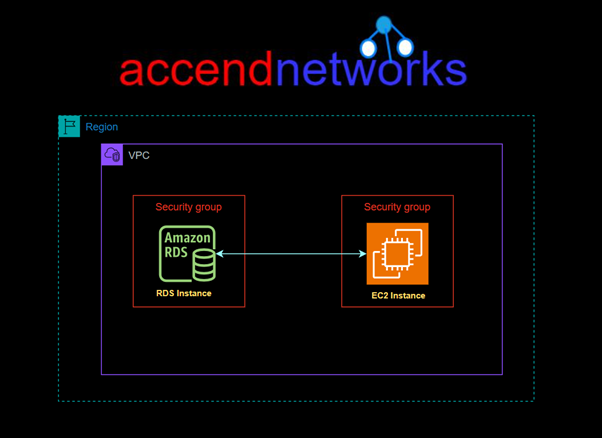
Amazon Web Services (AWS) provides various tools to simplify the management of web applications, including Amazon RDS (Relational Database Service) and EC2 instances. Amazon RDS is a fully managed service that allows users to set up, operate, and scale relational databases in the cloud. At the same time, EC2 (Elastic Compute Cloud) provides secure and scalable computing power. Connecting these two services is essential for applications requiring database backends for dynamic data storage.
In this hands-on guide, we’ll walk you through connecting an EC2 instance with Amazon RDS, covering essential configurations, security, and best practices.
For this project, I have an EC2 Instance already launched and running. To launch an EC2 instance, you can follow these steps.
Go to the EC2 Dashboard: Open the EC2 dashboard and select “Launch instance.”
Choose an Amazon Machine Image (AMI): Select an OS that suits your application environment, such as Amazon Linux or Ubuntu.
Select an Instance Type: Choose a size based on your application needs, considering the expected database connection load.
Configure Network and Security Settings:
Ensure the instance is in the same VPC as the RDS instance to avoid connectivity issues.
Assign a Security Group to the EC2 instance that allows outbound traffic on the port your RDS instance uses, port 3306.
Launch the Instance: Once configured, launch the instance and connect to it using SSH.
Let’s configure the IAM Role:
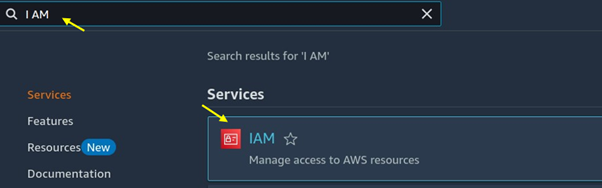
Go to the I AM console and search for I AM then select I AM under services.
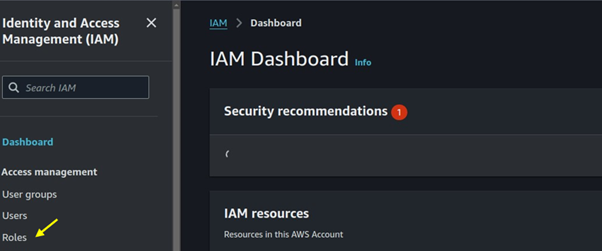
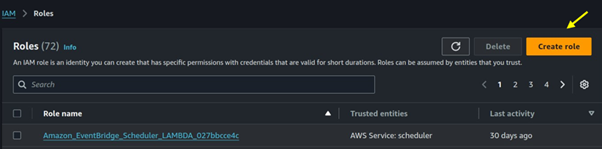
In the I AM dashboard, select roles then click on the create role button.
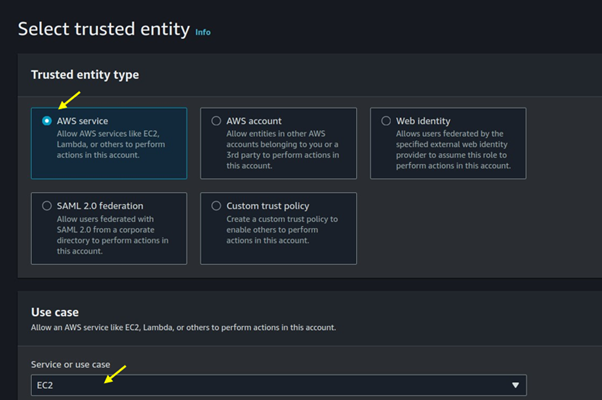
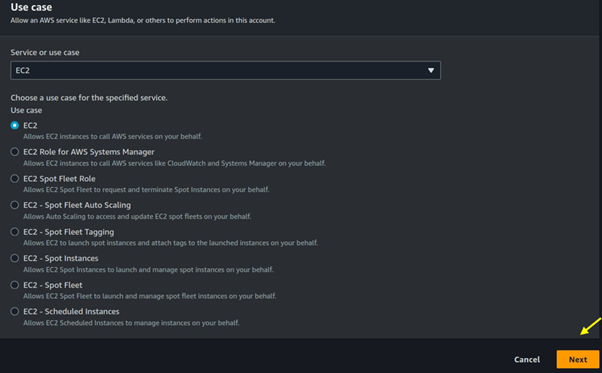
Under trusted entity select AWS service then use case select EC2, then scroll sown and click on the next button.
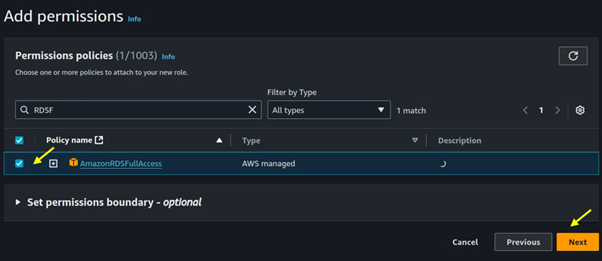
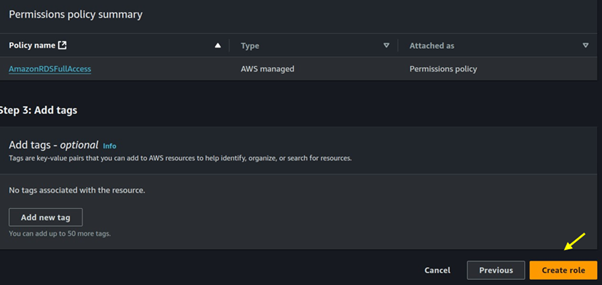
For permission select RDS full access, then click next.
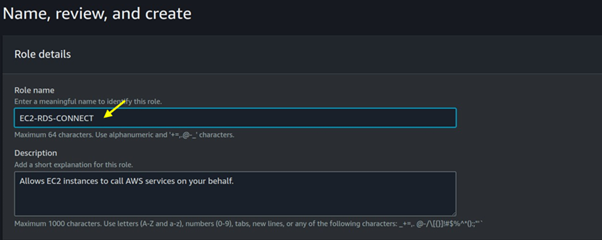
Name your role then click on the Create role.
Come back to your EC2 instance and then attach that role.
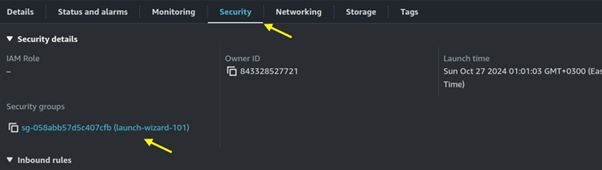
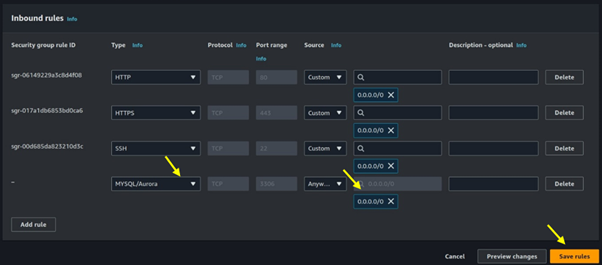
Since RDS listens on port 3306, we will open port 3306 in the security groups of our EC2 instance. Move to the security tab of your EC2 instance then click on the security group wizard.
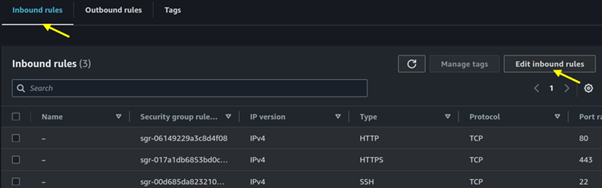
Move to the inbound rules tab then click on edit inbound rules.
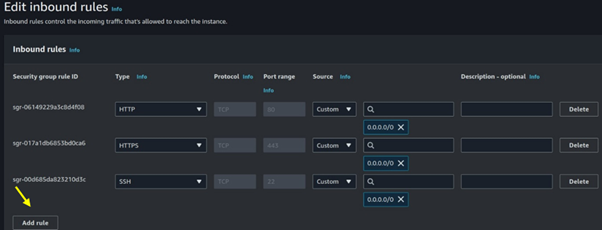
Select MYSQL/Aurora then for destination select 0.0.0.0/0 then click on save.
Set Up Amazon RDS
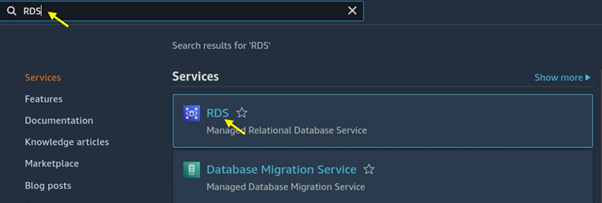
Navigate to the RDS console.
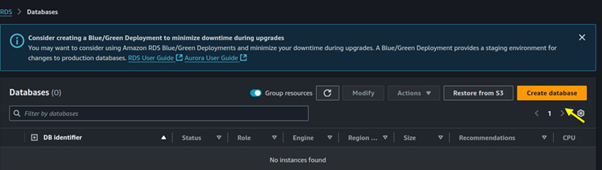
Click on DB instances then click on the Create database.
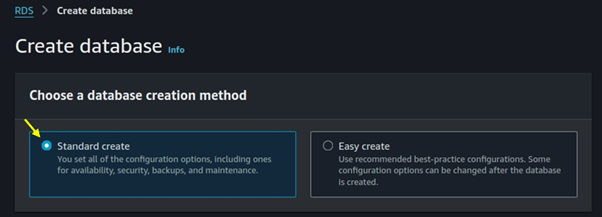
Choose standard create as the creation method.
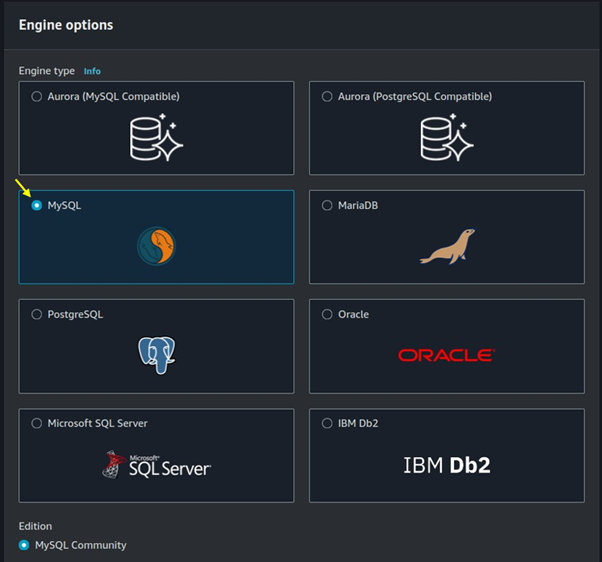
Choose MySQL as the DB engine type.
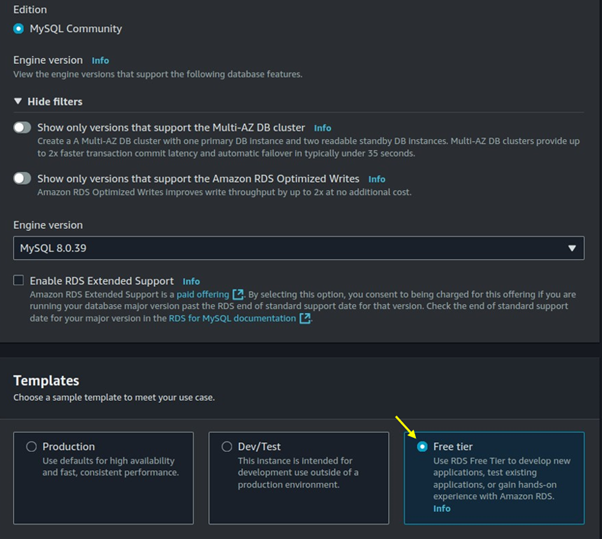
Move with the default Engine version then for templates select the free tier.
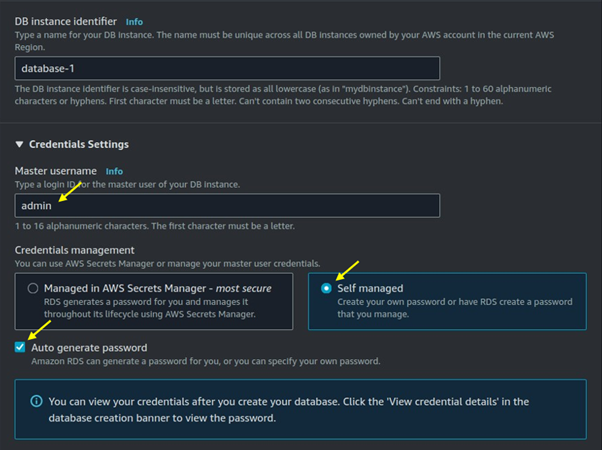
Under credentials settings choose the master username for your DB, then select self-managed. You can generate your password or choose an autogenerated password.
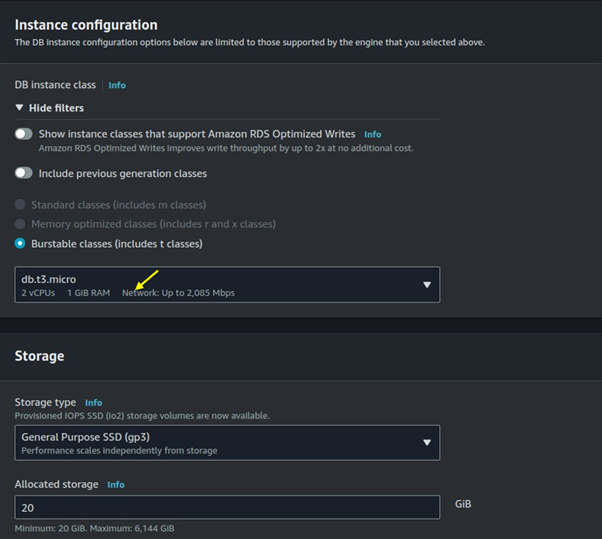
Under burstable classes, choose on dB t3. Micro then leaves storage as default.
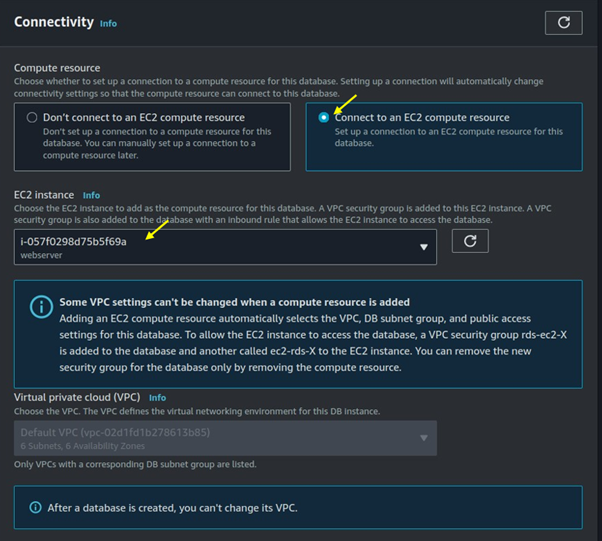
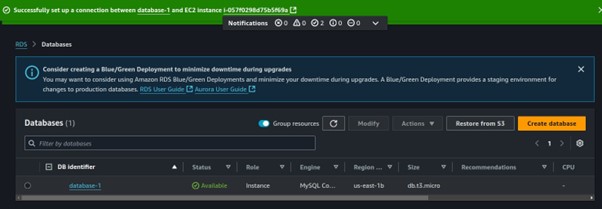
For connectivity select connect to an EC2 compute resource. Under EC2 instance select the drop-down button then select the EC2 instances you created.
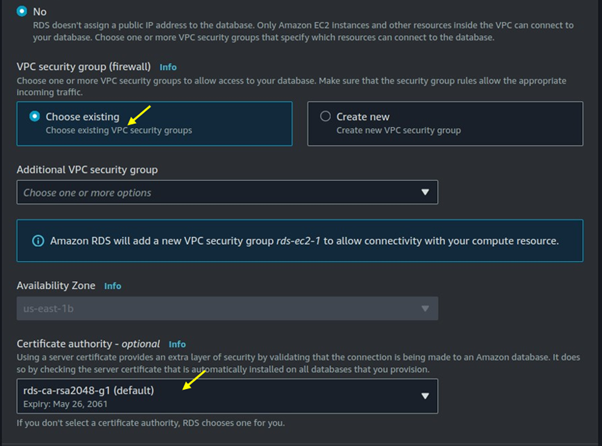
Under the VPC security firewall choose existing.
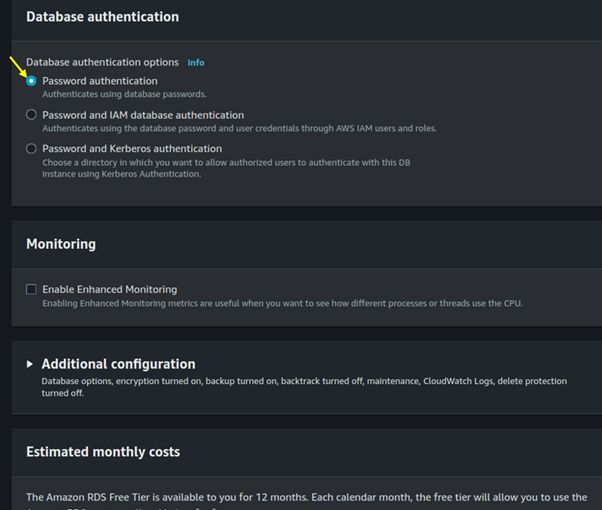
For database authentication, choose a password.
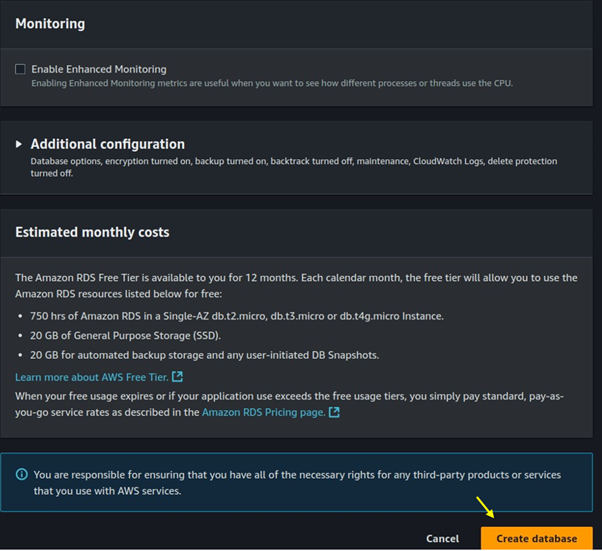
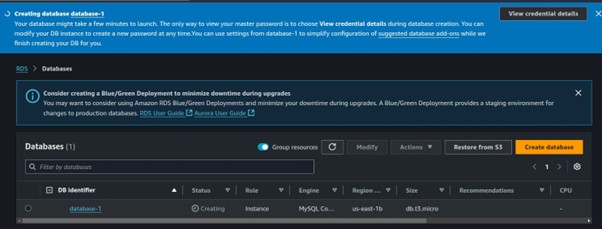
Scroll down and click on Create Database.
Database creation has been initiated.
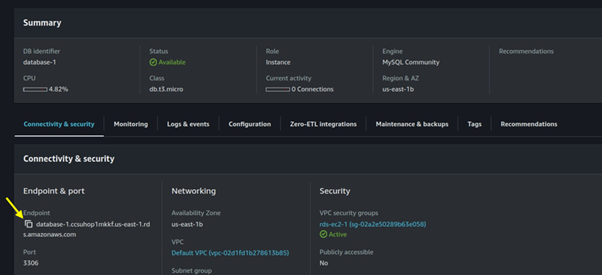
Click on the created database and copy the Database endpoint to your clipboard. Since we will need this for connecting to the database.
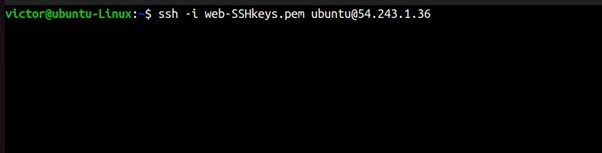
Now SSH into your EC2 instance.
Run this code to install the MySQL client.
sudo apt update
sudo apt install mysql-client -y
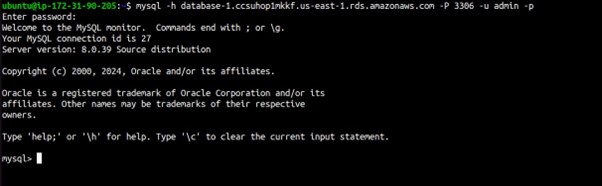
Now that the client software is installed, you can connect to your RDS instance.
mysql -h [RDS_ENDPOINT] -P [PORT] -u [USERNAME] -p
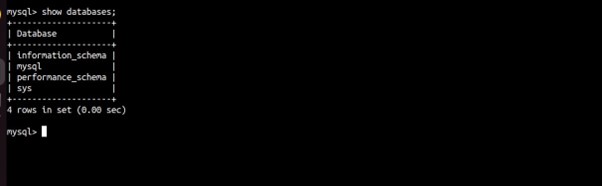
show databases;
Able to connect, thumps up.
Best Practices
Use IAM Authentication: For added security, enable IAM database authentication and manage access via AWS Identity and Access Management.
Enable Encryption: Encrypt the database at rest and enable SSL for in-transit data encryption.
Implement Monitoring and Logging: Use Amazon CloudWatch to monitor the database performance, and set up alerts for any unusual activity.
Maintain Security Groups: Review and tighten Security Group rules regularly to prevent unauthorized access.
Automate Backups: Configure automated backups for data recovery in case of data loss.
Conclusion
Connecting Amazon RDS with an EC2 instance involves careful configuration of network settings, security groups, and database settings. By following these steps, you’ll establish a secure and reliable connection between your EC2 instance and Amazon RDS, supporting scalable and highly available database access for your applications.
Thanks for reading and stay tuned for more. Make sure you clean up.
If you have any questions concerning this article or have an AWS project that requires our assistance, please reach out to us by leaving a comment below or email us at sales@accendnetworks.com.
Thank you!



more about tadalafil for ED
more about tadalafil for ED
Love the mobile experience! The app is stable and makes it so easy to play while commuting. okjiliapp is a game changer for me.
Sildenafil vs Levitra Speed
Sildenafil vs Levitra Speed
Finally found the official source for the app. The installation was a breeze and the performance is top notch. If you are wondering where to get it, just head over to jljl5download.
Sildenafil vs Cialis Onset Evidence
Sildenafil vs Cialis Onset Evidence
Why Sildenafil Onset Is Slow
Why Sildenafil Onset Is Slow
The app is very intuitive and the game selection is massive. It runs perfectly on my phone without any glitches. Definitely download jljl333apps if you’re a serious player.
The emphasis on security groups and VPC isolation is critical for data integrity. This principle of secure, seamless access is universal; whether it’s connecting an EC2 instance to RDS or ensuring users have reliable, disciplined access to their mobile entertainment, like the jollibee apk jollibee apk. Reliability in the backend dictates the quality of the front-end experience.
Okay, sharing my experience with betjili365! It’s a good one! Lots of promos and the payouts seem legit so far. Give it a try and let me know what you think!
Downloading the app was a game changer. Now I can play whenever I have a few minutes of free time. Total convenience with g777betappapk
The mobile version works perfectly and I can play anywhere on the go. Very convenient and fast loading times. Try 17jilicasinologin for a smooth ride.
I love how easy it is to sign up and start playing right away without long verification wait times here. The customer service team actually replies fast and helps you pick the right games for your budget. Definitely my go to app when I need a quick break copickem
Just tried logging in and everything ran so smooth. The bonuses hit right away and I love how fast the withdrawals are. Finally found a spot that actually pays out quick. Definitely my go to for evening sessions. okfunpluslogin
I am a huge fan of slot games and this place does not disappoint at all. The themes are creative and the bonus rounds trigger way more often than I expected. Withdrawals always land in my account within a few hours. You really need to see the slot collection for yourself yonoslots777
Interesting read. The depth of the ecosystem described suggests more than just slots; it’s about the competitive edge. For serious strategy, check out fb008 game. It’s about process, not just the payout.
This platform’s focus on fast, rhythmic design is intriguing. It seems like a solid blend of modern tech for casual players. For those exploring options, checking out the 7Spin Music apk might give a good baseline feel.
Seriously digging this analysis! The blend of social vibe with slots is key. For more deep dives into that feel, check out jilibet games; totally hits the mark on modern fun.
It’s fascinating how platforms like 25ph casino app download apk are optimizing user experience with data – crucial for engagement. The verification steps they detail seem robust, building trust which is key in this space! 🤔
minoxidil men’s regrowth data
minoxidil men’s regrowth data
ivermectin patient questions
ivermectin patient questions
terbinafine side effects breakdown
terbinafine side effects breakdown
ketoconazole cream essential info
ketoconazole cream essential info
That’s a fascinating take on blending bingo & slots! I’ve seen similar hybrid approaches gaining traction. Curious to see how platforms like happy bingo online casino cater to both audiences with their app download APK & varied game themes. It’s a smart move for mobile-first gaming!
The best thing about play ashers fun clicker 5 is how quickly you can start playing. Good page for testing a new clicker game.
I enjoyed ashers fun clicker 5 more than expected. It is a small game, but the clicker mechanics are satisfying enough.
play aura clicker has a nice casual feel. It is simple, but that is exactly what makes this kind of clicker game easy to replay.
keeps minoxidil foam
keeps minoxidil foam
rogaine topical ingredients
rogaine topical ingredients
vardenafil tadalafil combo
vardenafil tadalafil combo
The reads here suggest tilt management is key. Remember, even solid fundamentals need a touch of psychology. Check out bigbunny app game for some different angles.
After testing multiple PH gaming sites, I finally found Bouncy Ball’s transparent RTP tracking impressive; start your journey today via Bouncy Ball login and experience their secure, data-driven entertainment platform built for local players.
ranitidine zantac uses
ranitidine zantac uses
https://shorturl.fm/mxdzj
https://shorturl.fm/g9jso
https://shorturl.fm/gFfro
tadalafil bd
tadalafil bd
viagra pills costco
viagra pills costco
cheapest cialis reddit
cheapest cialis reddit
doxycycline hyclate for uti
doxycycline hyclate for uti
furosemide 20 mg for dogs
furosemide 20 mg for dogs
udenafil tablets price
udenafil tablets price
furosemide 20 mg price
furosemide 20 mg price
doxycycline mono 100mg cap
doxycycline mono 100mg cap
Luckyblockcasinobonus is the real deal bro! Good times there. So you could try it out sometime. Word, luckyblockcasinobonus is the way to go bruh!
Cassino1real? Heard of it. Tried playing a bit. Not bad at all! Just giving you a pointer to cassino1real.
Gobetplaylogin is pretty helpful for sorting you out for the other stuff. No muss, no fuss and easy to use. Here’s the link: gobetplaylogin
lasix 40 mg tablet
lasix 40 mg tablet
what is tetracycline
what is tetracycline
metoprolol beta blocker
metoprolol beta blocker
finasteride hair loss
finasteride hair loss