Accend Networks San Francisco Bay Area Full Service IT Consulting Company

Categories
Blogs

Effortless Job Processing with AWS Batch

Effortless Job Processing with AWS Batch: A Complete Guide to Scaling Compute Workloads
Efficient job processing is essential for organizations handling complex computing workloads. AWS Batch, Amazon Web Services’ fully managed batch processing service, streamlines this process by automating the scheduling, provisioning, and scaling of compute resources.

What is AWS Batch?

AWS Batch is a fully managed service that enables you to run large-scale compute workloads in the cloud without provisioning resources or managing schedulers. The service takes care of infrastructure management, so you can focus on designing your workflows instead of worrying about underlying resources.

AWS Batch dynamically provisions the optimal quantity and type of compute resources (for example, CPU or memory-optimized instances) based on the volume and specified resource requirements of the batch jobs submitted.

It plans, schedules, and executes your batch computing workloads across the full range of AWS compute services and features, such as Amazon EC2 and Spot Instances.
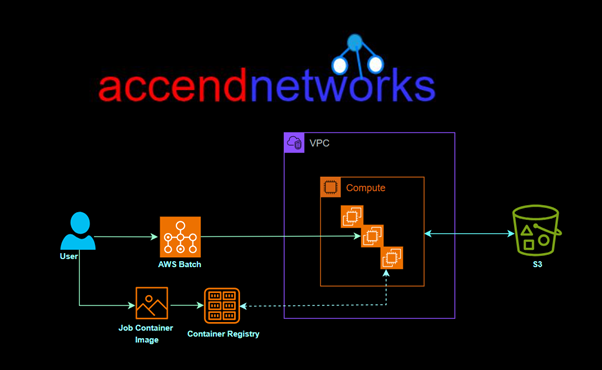
Here’s a breakdown of key components and how AWS Batch works:

Components:

Compute Environments: AWS Batch uses compute environments to manage the infrastructure on which your batch jobs run.

It supports both EC2 instances and AWS Fargate containers as computing resources.

Job Definitions: A job definition specifies how a job is to be run, including the Docker image to be used, the command to be executed, and various parameters.

It encapsulates the information needed for jobs to be submitted to the batch environment.

Job Queues: Job queues are used to submit jobs. You submit a job to a specific queue, and AWS Batch places the job in the queue.

Each queue is associated with one or more priority levels, which determines the order in which jobs are scheduled.

Jobs: Jobs are the unit of work in AWS Batch. Each job is defined by a job definition, and it runs on an Amazon EC2 instance or an AWS Fargate container.

Workflow

Submit Job: Users submit jobs to a specific job queue. The job queue contains a list of jobs that are waiting to run.

Job Scheduler: AWS Batch job scheduler takes care of prioritizing, scheduling, and launching jobs based on the job queue’s priority levels.

Compute Environment Allocation: The job scheduler allocates compute resources from the defined compute environment to run the jobs.

Run Jobs: Jobs are executed on EC2 instances or Fargate containers based on the specifications in the job definition.

 Monitoring and Logging: AWS Batch provides monitoring through Amazon CloudWatch, allowing you to track the progress of jobs, resource utilization, and other relevant metrics.

Scaling: AWS Batch can automatically scale compute resources based on the workload. It can dynamically adjust the number of instances or containers in the computing environment to accommodate changes in demand.

Key Features of AWS Batch

Flexible Compute Workloads: AWS Batch supports both on-demand and Spot Instances in Amazon EC2, and AWS Fargate for serverless compute environments. This allows you to choose the most cost-effective or high-performance resources based on your workload.

Automatic Job Scheduling: With AWS Batch, job scheduling and queue management are automated, ensuring jobs are executed in the most efficient order.

Dynamic Resource Scaling: AWS Batch dynamically scales compute resources to meet the requirements of your jobs.

Seamless AWS Integration: AWS Batch integrates seamlessly with other AWS services like Amazon S3, Amazon RDS, and Amazon CloudWatch.

Benefits of AWS Batch
  • Efficient Job Processing
  • Cost-Effective Batch Processing with AWS Spot Instances
  • High Scalability
  • Easy Integration with Data Pipelines

AWS Batch vs. Other Processing Solutions

When compared to other solutions like Amazon Lambda, Amazon EC2, or traditional on-premises processing, AWS Batch stands out in several ways:

AWS Batch vs. Lambda: AWS Lambda is ideal for lightweight, short-duration tasks, while AWS Batch is designed for long-running, compute-heavy jobs that require scaling across multiple instances.

AWS Batch vs. EC2: AWS Batch is a more efficient choice than manually managing EC2 instances for batch processing, as it automates scaling and job scheduling, reducing the need for administrative overhead.

Batch Processing vs. Real-Time Processing: While AWS Batch excels in handling large-scale, time-independent jobs, real-time processing solutions like AWS Kinesis are better for streaming data and instant analytics.

Common Use Cases for AWS Batch

Data Processing: AWS Batch is ideal for data-intensive tasks such as ETL processes, analytics, and report generation, where jobs are scheduled to process large datasets.

Financial Modeling and Simulations: Financial institutions use AWS Batch for tasks like Monte Carlo simulations, risk assessment, and financial forecasting, which require substantial computing power.

Scientific Research and Analysis: Researchers rely on AWS Batch for simulations, data analysis, and processing large datasets from experiments, which often need parallel computing.

Machine Learning: Data preprocessing for machine learning workflows, such as image processing or data transformation, can be automated and scaled using AWS Batch.

Conclusion

AWS Batch offers a flexible and cost-effective way to manage large computing tasks. It automatically schedules, adjusts, and manages computing resources, making it simpler to handle complex jobs and reducing the need for manual management.

Thanks for reading and stay tuned for more.

If you have any questions concerning this article or have an AWS project that requires our assistance, please reach out to us by leaving a comment below or email us at sales@accendnetworks.com.


Thank you!
Categories
Blogs

Unlocking the Power of Amazon Aurora

Unlocking the Power of Amazon Aurora: A Comprehensive Guide to High-Performance Databases

Amazon Aurora is a fully managed, relational database service that combines the performance and availability of high-end commercial databases with the simplicity and cost-effectiveness of open-source databases. In this blog, we’ll explore the key features of Amazon Aurora, its advantages, and how it stands out in the world of cloud databases.

What is Amazon Aurora?

A fully managed MySQL and PostgreSQL-compatible relational database built for the cloud that combines the performance and availability of traditional enterprise databases with the simplicity and cost-effectiveness of open-source databases.

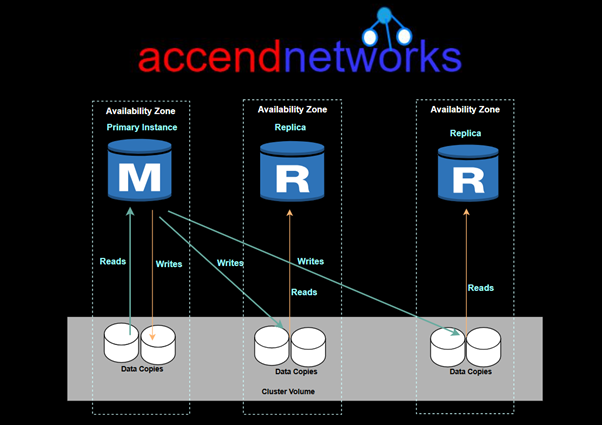
Two types of DB instances make up an Aurora DB cluster

Primary Instance — Supports read and write operations, and performs all of the data modifications to the cluster volume. Each Aurora DB cluster has one primary DB instance.

Replica Instances— Connects to the same storage volume as the primary DB instance and supports only read operations. Each Aurora DB cluster can have up to 15 Aurora Replicas in addition to the primary DB instance.

Key Points

  • Amazon Aurora architecture gives separation of storage and computing.
  • Automatic failover to reader instance — When a problem affects the primary instance, one of these reader instances takes over as the primary instance.
  • The cluster endpoint always represents the current primary instance in the cluster. To use a connection string that stays the same even when a failover promotes a new primary instance, you connect to the cluster endpoint.
  • Aurora automates and standardizes database clustering and replication, which are typically among the most challenging aspects of database configuration and administration.

Key Features of Amazon Aurora

High-Performance Amazon Aurora is designed to deliver performance that far exceeds traditional MySQL and PostgreSQL databases.

Scalability Aurora’s architecture supports auto-scaling to accommodate growing database needs. You can scale your database up or down with minimal manual intervention.

High Availability and Durability Aurora provides built-in high availability with a replication feature that spans multiple availability zones.

Automated Backups Amazon Aurora automates backups, and these backups are continuous and incremental, ensuring that no data is lost.

SecurityAmazon Aurora provides multiple layers of security. It supports encryption of data both at rest and in transit using SSL. Additionally, it integrates seamlessly with AWS Identity and Access Management (IAM) for access control, Amazon VPC for network isolation, and AWS Key Management Service (KMS) for key management.

Multi-Master Support Amazon Aurora supports multi-master replication, which allows you to write to multiple Aurora instances in different Availability Zones.

Amazon Aurora MySQL vs PostgreSQL

Amazon Aurora is compatible with both MySQL and PostgreSQL, and it provides a high level of performance for both engines. When choosing between Aurora MySQL and Aurora PostgreSQL, businesses should consider their application’s needs:

  • Aurora MySQL is ideal for applications that rely on MySQL’s features and syntax but require more scalability and performance than what standard MySQL can offer.
  • Aurora PostgreSQL provides the performance and scalability of Aurora with the rich feature set of PostgreSQL, making it a great choice for data-intensive applications that need advanced data types and custom functions.

Amazon Aurora Serverless

For applications with unpredictable database workloads, Amazon Aurora Serverless offers an on-demand, auto-scaling configuration. Aurora Serverless automatically adjusts the compute capacity based on application needs, and you only pay for the capacity you use. This makes it a cost-effective option for infrequent or variable workloads, such as development, testing, or low-traffic applications.

Read Replicas

  • Elastically scale out beyond the capacity constraints of a single DB instance for read-heavy database workloads.
  • Aurora Replicas connect to the same storage volume as the primary DB instance, but support read operations only.
  • Aurora DB cluster with single-master replication has one primary DB instance and up to 15 Aurora Replicas.

Advantages of Amazon Aurora

Advantages:

  • Global reads with local latency.
  • Scalable secondary Aurora DB clusters.
  • Fast replication from primary to secondary Aurora DB clusters.
  • Recovery from Region-wide outages (lower RTO and RPO).

Use Cases for Amazon Aurora

E-commerce Platforms: With high availability, fault tolerance, and the ability to handle high traffic spikes, Amazon Aurora is perfect for large-scale e-commerce platforms that require database scalability.

Gaming: Games with large player bases can benefit from Aurora’s fast, scalable database capabilities, which can handle millions of transactions per second.

SaaS Applications: Aurora’s flexibility, high performance, and multi-region replication make it a great choice for SaaS companies that need reliable, low-latency access to their databases.

Conclusion

Amazon Aurora is a fully managed relational database engine that’s compatible with MySQL and PostgreSQL which makes it easier, faster, and cost-effective to manage your data and build scalable, reliable, and high-performance applications.

Thanks for reading and stay tuned for more.

If you have any questions concerning this article or have an AWS project that requires our assistance, please reach out to us by leaving a comment below or email us at sales@accendnetworks.com.


Thank you!
Categories
Blogs

Amazon Work Mail

Amazon WorkMail: A Comprehensive Guide

In today’s digital age, having a reliable, secure, and adaptable email system is crucial for businesses. Amazon WorkMail, a service within Amazon Web Services (AWS), provides companies with a secure email and calendar solution that integrates well with other AWS services and common email applications. In this article, we’ll discuss the key features, benefits, and setup tips for Amazon WorkMail.

What is Amazon WorkMail?

Amazon WorkMail is a fully managed email and calendaring service that allows organizations to securely manage communications while offering a familiar experience through existing email clients. Unlike typical email services, Amazon WorkMail offers integration with the AWS ecosystem, making it an attractive choice for businesses already utilizing AWS.

Key Features of Amazon WorkMail

Secure and Compliant: Amazon WorkMail is designed with enterprise-grade security, including multi-factor authentication (MFA), encryption, and spam filtering. It’s compliant with various regulatory requirements, making it a secure option for businesses needing strict data protection.

Seamless Email and Calendar Integration: Amazon WorkMail integrates with popular email clients like Microsoft Outlook and native iOS and Android mail apps, providing users with a familiar interface.

Active Directory Integration: Companies using Microsoft Active Directory can integrate it with Amazon WorkMail, enabling single sign-on (SSO) for streamlined user management and simplified authentication.

AWS Integration: Amazon WorkMail can integrate with other AWS services such as Amazon SES for email sending, Amazon S3 for data storage, and Amazon CloudTrail for activity monitoring, giving businesses a powerful way to centralize their data infrastructure.

Cost-Effective and Scalable: With pay-as-you-go pricing, Amazon WorkMail offers an affordable solution without the need for upfront infrastructure investment. This is particularly beneficial for businesses looking to scale their communication tools as they grow.

Benefits of Using Amazon WorkMail

Amazon WorkMail provides several advantages, particularly for businesses already in the AWS ecosystem:

  • Enhanced Security: WorkMail’s security features, like data encryption, MFA, and spam filtering, protect against cyber threats and data leaks, crucial for sensitive business communications.
  • Streamlined Administration: Through the AWS Management Console, administrators can easily configure security policies, manage users, and monitor email activity.
  • Flexible Access: Amazon WorkMail offers cross-platform compatibility, making it easy for employees to access their emails from any device, whether on desktop, mobile or through web browsers.
  • Easy Migration and Setup: With Amazon’s tools and migration guides, organizations can move existing email data to Amazon WorkMail with minimal disruption.

Use Cases for Amazon WorkMail

  1. Small to Medium Businesses: Amazon WorkMail is an ideal solution for businesses looking to reduce infrastructure costs and streamline email management.
  2. Enterprises Using AWS: Organizations already using AWS benefit greatly from WorkMail’s integration with AWS services, simplifying operations.
  3. Remote Teams: With WorkMail’s cloud-based infrastructure, team members can securely access email from anywhere, ensuring reliable communication even in remote work settings.

Amazon WorkMail vs. Traditional Email Services

Amazon WorkMail competes with other email solutions like Microsoft Exchange and Google Workspace. Here’s how it stands out:

  • AWS Integration: WorkMail’s integration with other AWS tools provides unique advantages for AWS-focused organizations, such as the ability to store emails directly in Amazon S3 or send email notifications via Amazon SES.
  • Flexible Pay-As-You-Go Pricing: Unlike subscription-based pricing models, WorkMail’s pricing is based on usage, allowing businesses to only pay for what they need.
  • Data Sovereignty and Compliance: Organizations with strict compliance requirements may prefer Amazon WorkMail for its regional data storage options and regulatory alignment.

Conclusion

Amazon WorkMail is a robust, secure, and flexible email solution for businesses of all sizes. With AWS’s reliable infrastructure, WorkMail provides enhanced security, cross-platform accessibility, and cost-effective scalability.

Thanks for reading and stay tuned for more.

If you have any questions concerning this article or have an AWS project that requires our assistance, please reach out to us by leaving a comment below or email us at sales@accendnetworks.com.


Thank you!
Categories
Blogs

How to Set Up and Connect Amazon RDS with EC2: A Practical Guide

How to Set Up and Connect Amazon RDS with EC2: A Practical Guide

Amazon RDS configuration settings

What is Amazon RDS?

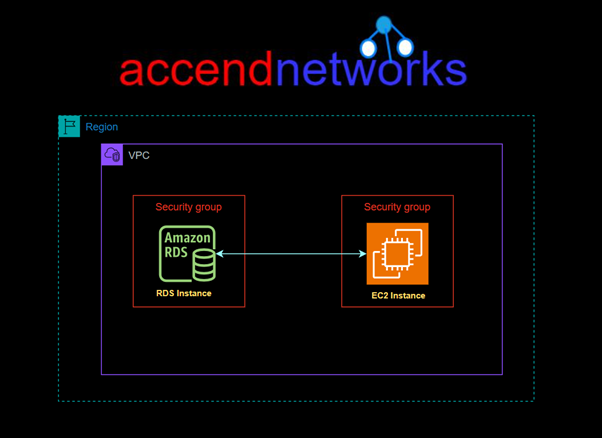
Amazon Web Services (AWS) provides various tools to simplify the management of web applications, including Amazon RDS (Relational Database Service) and EC2 instances. Amazon RDS is a fully managed service that allows users to set up, operate, and scale relational databases in the cloud. At the same time, EC2 (Elastic Compute Cloud) provides secure and scalable computing power. Connecting these two services is essential for applications requiring database backends for dynamic data storage.

In this hands-on guide, we’ll walk you through connecting an EC2 instance with Amazon RDS, covering essential configurations, security, and best practices.

For this project, I have an EC2 Instance already launched and running. To launch an EC2 instance, you can follow these steps.

Go to the EC2 Dashboard: Open the EC2 dashboard and select “Launch instance.”

Choose an Amazon Machine Image (AMI): Select an OS that suits your application environment, such as Amazon Linux or Ubuntu.

Select an Instance Type: Choose a size based on your application needs, considering the expected database connection load.

Configure Network and Security Settings:

Ensure the instance is in the same VPC as the RDS instance to avoid connectivity issues.

Assign a Security Group to the EC2 instance that allows outbound traffic on the port your RDS instance uses, port 3306.

Launch the Instance: Once configured, launch the instance and connect to it using SSH.

Let’s configure the IAM Role:

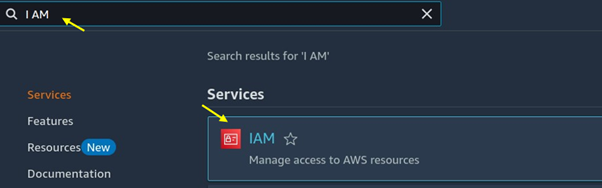
Go to the I AM console and search for I AM then select I AM under services.

Amazon RDS configuration settings

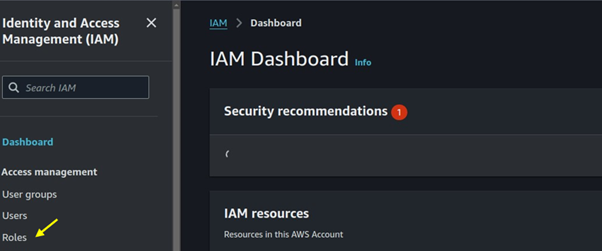
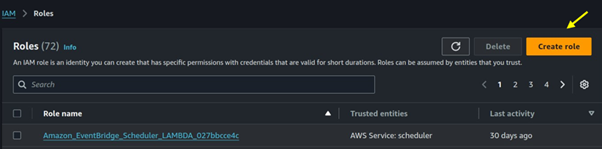
In the I AM dashboard, select roles then click on the create role button.

Amazon RDS configuration settings

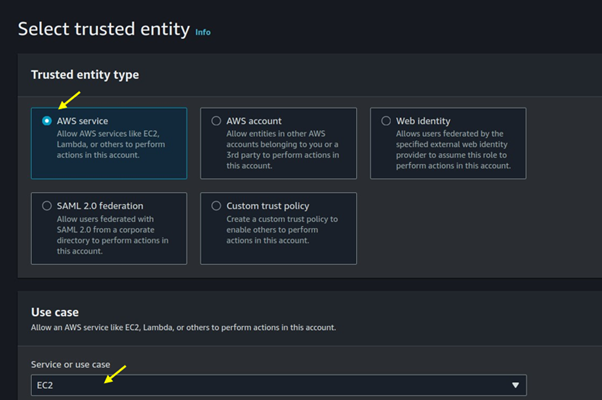
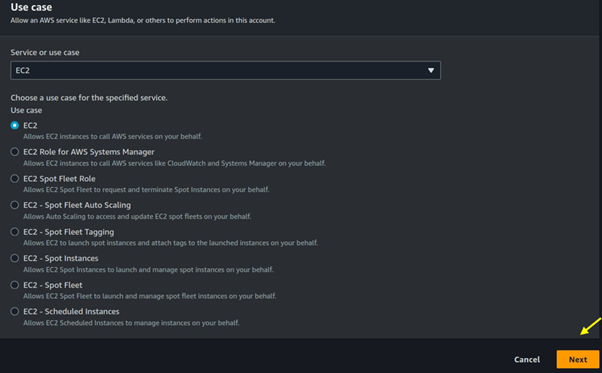
Under trusted entity select AWS service then use case select EC2, then scroll sown and click on the next button.

Amazon RDS configuration settings

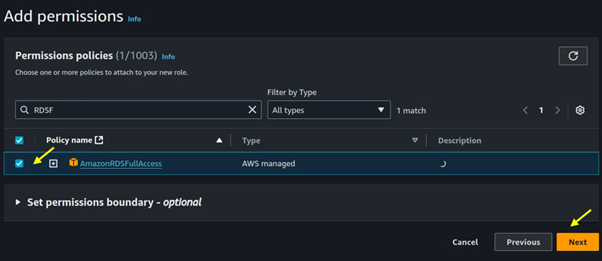
For permission select RDS full access, then click next.

Amazon RDS configuration settings

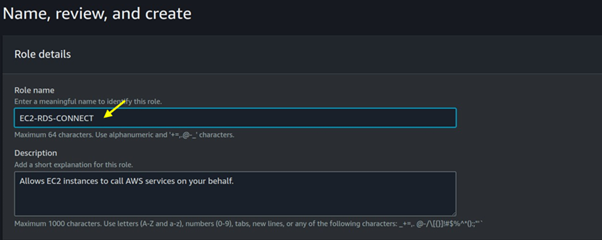
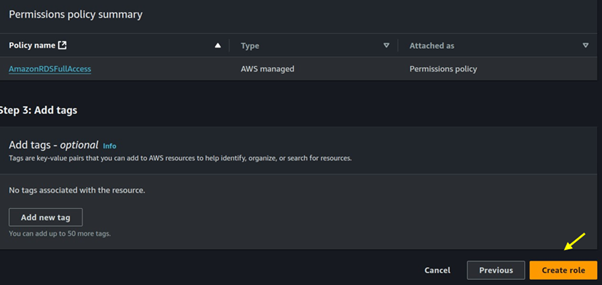
Name your role then click on the Create role.

Amazon RDS configuration settings

Come back to your EC2 instance and then attach that role.

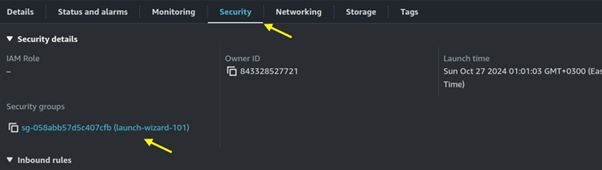
Since RDS listens on port 3306, we will open port 3306 in the security groups of our EC2 instance. Move to the security tab of your EC2 instance then click on the security group wizard.

Amazon RDS configuration settings

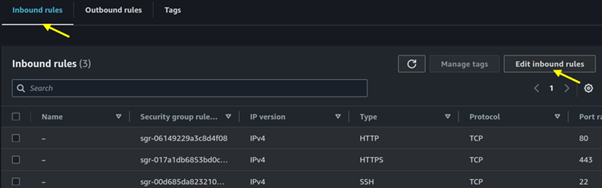
Move to the inbound rules tab then click on edit inbound rules.

Amazon RDS configuration settings

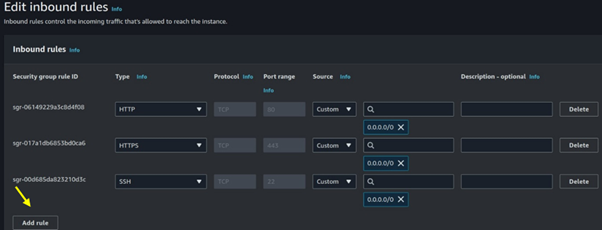
Click add rule.

Amazon RDS configuration settings

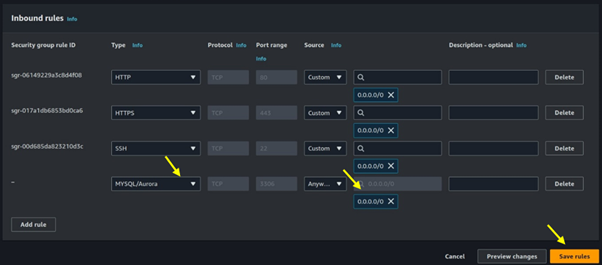
Select MYSQL/Aurora then for destination select 0.0.0.0/0 then click on save.

Amazon RDS configuration settings

Set Up Amazon RDS

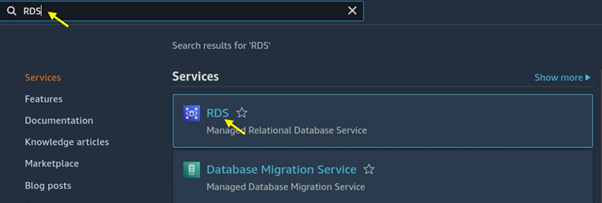
Navigate to the RDS console.

Amazon RDS configuration settings

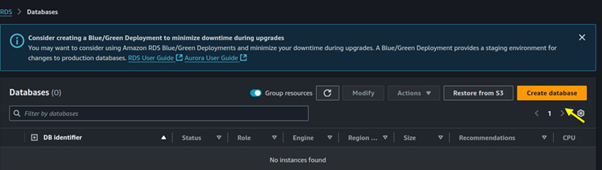
Click on DB instances then click on the Create database.

Amazon RDS configuration settings

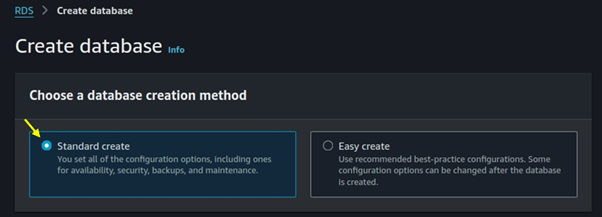
Choose standard create as the creation method.

Amazon RDS configuration settings

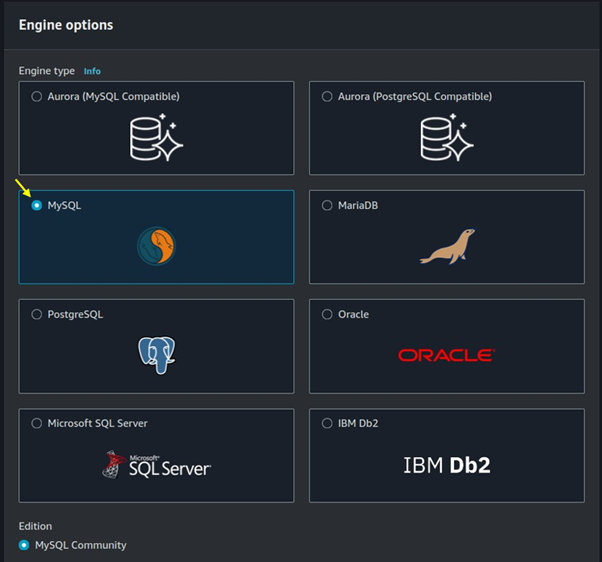
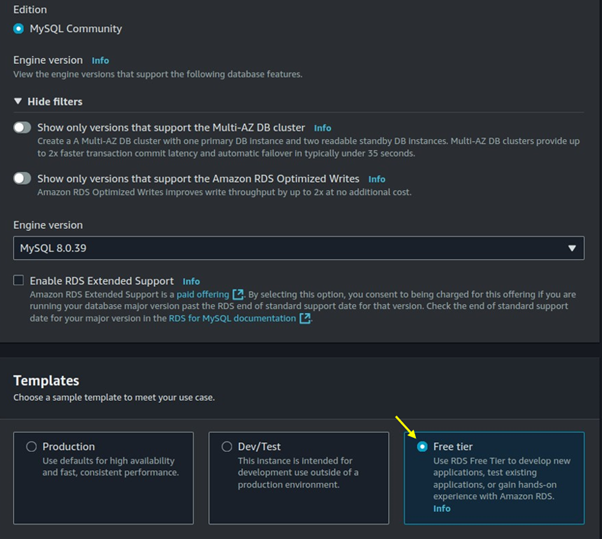
Choose MySQL as the DB engine type.

Amazon RDS configuration settings

Move with the default Engine version then for templates select the free tier.

Amazon RDS configuration settings

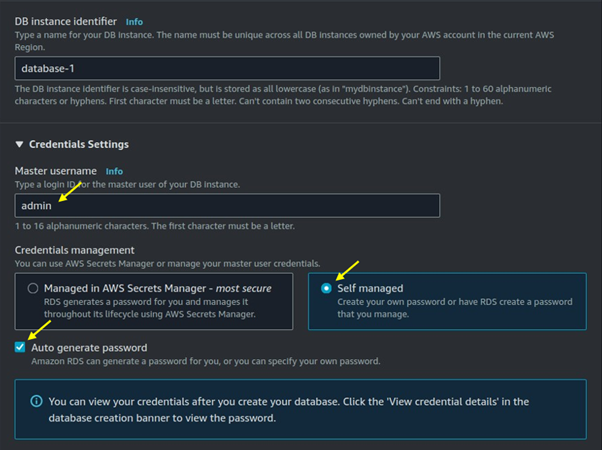
Under credentials settings choose the master username for your DB, then select self-managed. You can generate your password or choose an autogenerated password.

Amazon RDS configuration settings

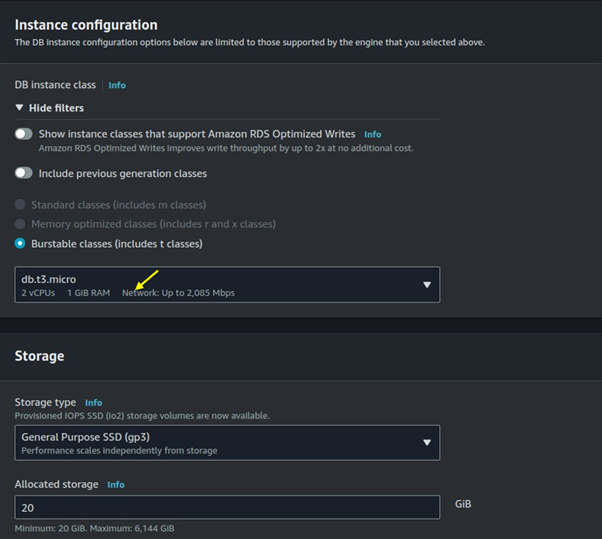
Under burstable classes, choose on dB t3. Micro then leaves storage as default.

Amazon RDS configuration settings

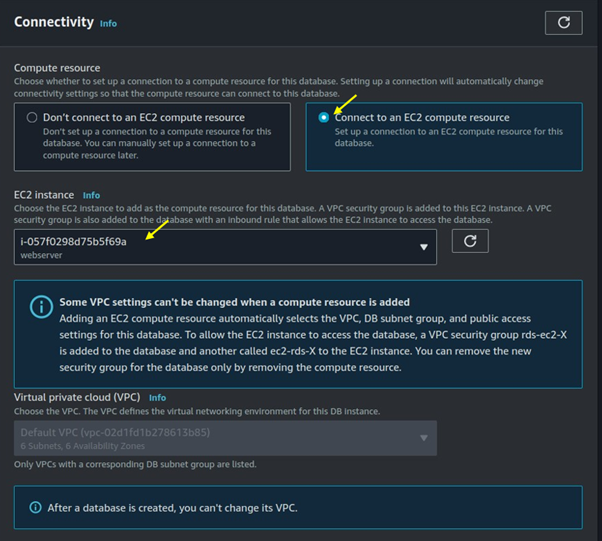
For connectivity select connect to an EC2 compute resource. Under EC2 instance select the drop-down button then select the EC2 instances you created.

Amazon RDS configuration settings

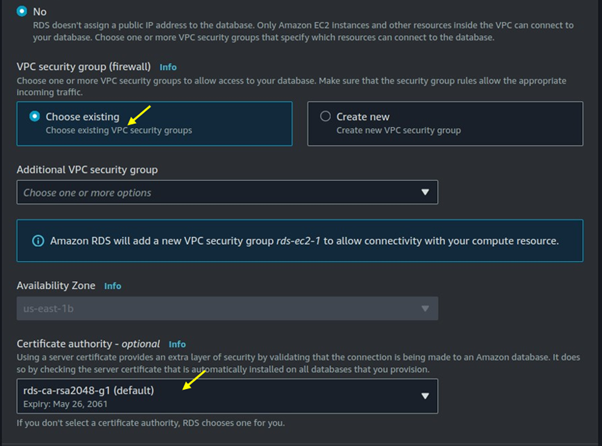
Under the VPC security firewall choose existing.

Amazon RDS configuration settings

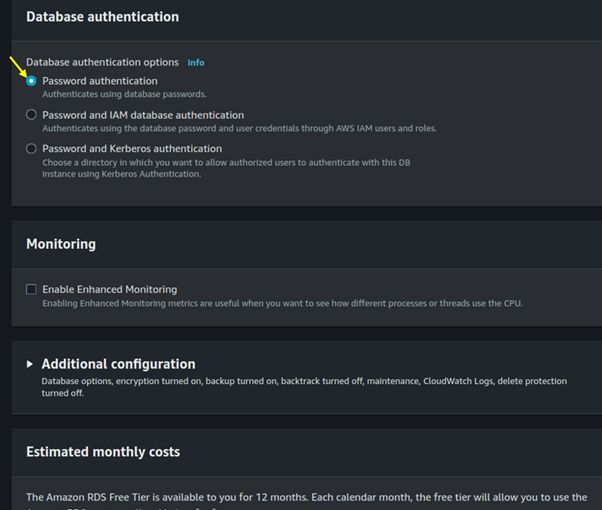
For database authentication, choose a password.

Amazon RDS configuration settings

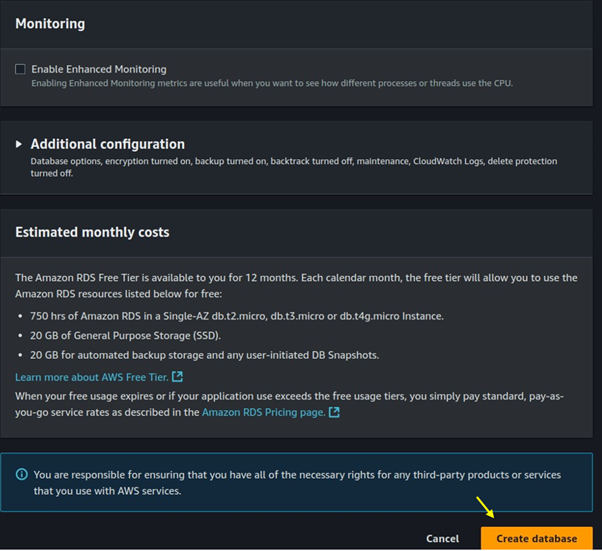
Scroll down and click on Create Database.

Amazon RDS configuration settings

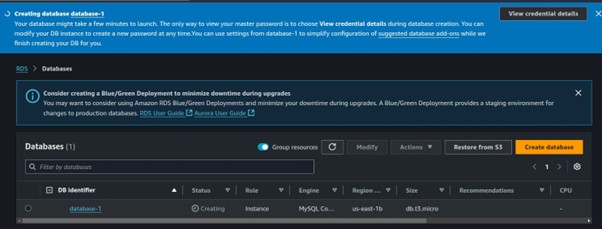
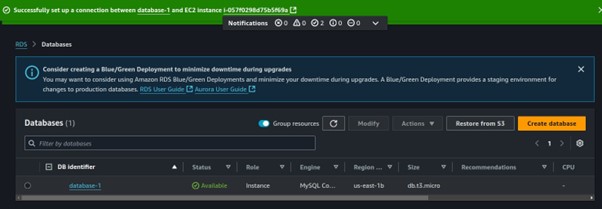
Database creation has been initiated.

Amazon RDS configuration settings

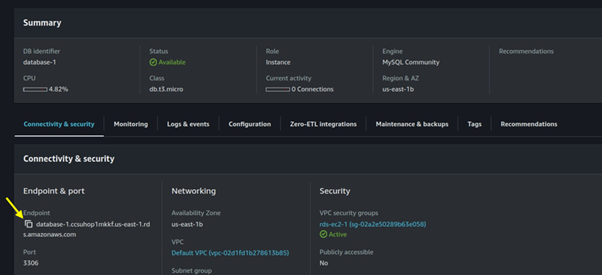
Click on the created database and copy the Database endpoint to your clipboard. Since we will need this for connecting to the database.

Amazon RDS configuration settings

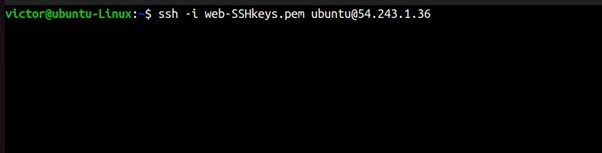
Now SSH into your EC2 instance.

Amazon RDS configuration settings

Run this code to install the MySQL client.

sudo apt update

sudo apt install mysql-client -y

Amazon RDS configuration settings

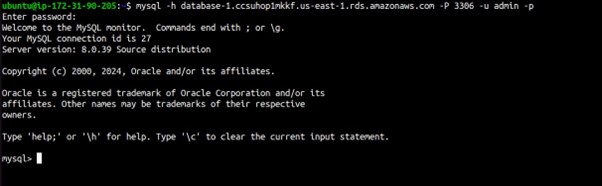
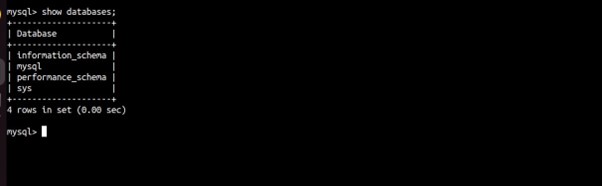
Now that the client software is installed, you can connect to your RDS instance.

mysql -h [RDS_ENDPOINT] -P [PORT] -u [USERNAME] -p
show databases;

Amazon RDS configuration settings

Able to connect, thumps up.

Amazon RDS configuration settings

Best Practices

Use IAM Authentication: For added security, enable IAM database authentication and manage access via AWS Identity and Access Management.

Enable Encryption: Encrypt the database at rest and enable SSL for in-transit data encryption.

Implement Monitoring and Logging: Use Amazon CloudWatch to monitor the database performance, and set up alerts for any unusual activity.

Maintain Security Groups: Review and tighten Security Group rules regularly to prevent unauthorized access.

Automate Backups: Configure automated backups for data recovery in case of data loss.

Conclusion

Connecting Amazon RDS with an EC2 instance involves careful configuration of network settings, security groups, and database settings. By following these steps, you’ll establish a secure and reliable connection between your EC2 instance and Amazon RDS, supporting scalable and highly available database access for your applications.

Thanks for reading and stay tuned for more. Make sure you clean up.

If you have any questions concerning this article or have an AWS project that requires our assistance, please reach out to us by leaving a comment below or email us at sales@accendnetworks.com.


Thank you!
Categories
Blogs

Understanding Amazon EKS: Managed Kubernetes on AWS

Understanding Amazon EKS: Managed Kubernetes on AWS

As more companies adopt containerization, the importance of strong container management tools grows. Amazon Elastic Kubernetes Service (EKS) is a helpful tool for running Kubernetes clusters on AWS. It offers a managed service that makes it easier to deploy, scale, and manage containerized applications. In this blog, we’ll look at the features of Amazon EKS and its benefits compared to other container management solutions.

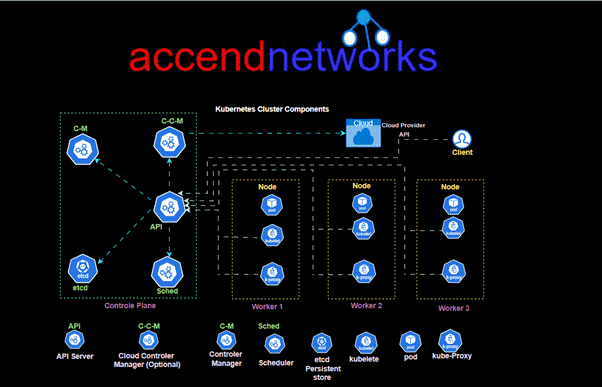
To understand what EKS is trying to solve, let's take a look at the Kubernetes architecture provided above.

The above Kubernetes architecture consists of a master node (control plane) and multiple worker nodes, creating a robust system for orchestrating containerized applications. The control plane manages the cluster and includes components like the API Server, which is the central hub for all communication; etcd, a distributed key-value store that keeps configuration data and state; Controller Manager, which enforces the desired state by managing replicas and handling failures; and Scheduler, which assigns pods to nodes based on resource availability. Worker nodes host containers, managed by kubelet (which ensures that containers are running) and kube-proxy (which manages networking

What is Amazon EKS?

Amazon EKS is a managed Kubernetes service that allows you to run Kubernetes clusters on AWS without the complexity of managing the Kubernetes control plane. Kubernetes itself is an open-source system for automating the deployment, scaling, and management of containerized applications, primarily using Docker. EKS abstracts much of the complexity associated with setting up and maintaining a Kubernetes environment, enabling developers to focus on building applications rather than managing infrastructure.

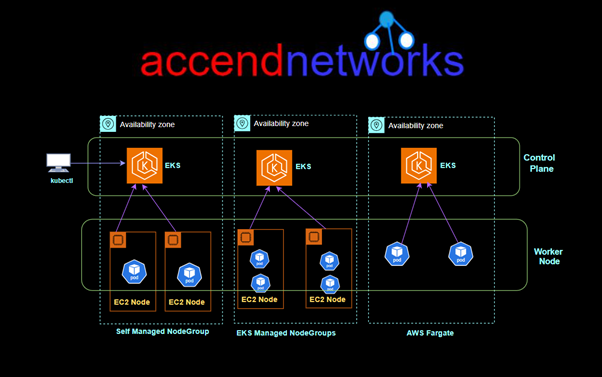
Amazon EKS provides a scalable, highly available control plane for Kubernetes workloads. When you run applications on Amazon EKS, as with Amazon ECS, you can choose to provide the underlying compute power for your containers with Amazon EC2 instances or with AWS Fargate.

Amazon EKS vs. Amazon ECS

While both Amazon EKS and Amazon Elastic Container Service (ECS) are designed to manage containerized applications, they cater to different user needs:

  • EKS provides a Kubernetes-native experience and is ideal for organizations that are already using Kubernetes in other environments or want a cloud-agnostic solution across providers like AWS, Azure, or GCP.
  • ECS: Offers a simpler, AWS-native experience with tighter integration into the AWS ecosystem, making it easier for teams already leveraging AWS services.

Both services aim to achieve similar goals, but the choice between EKS and ECS often depends on existing infrastructure and expertise within the organization.

Deploying with Amazon EKS: EC2 and Fargate

EKS supports two primary deployment models for worker nodes:

EC2 Worker Nodes

  • Managed Node Groups: EKS can create and manage EC2 instances for you, automatically registering them to your Kubernetes cluster. These nodes are part of an Auto Scaling Group (ASG) and can use on-demand or spot instances, optimizing cost and performance.
  • Self-Managed Nodes: Using Amazon EKS Optimized AMIs, you can create and manage your own EC2 instances and manually register them to the EKS cluster.

AWS Fargate

For a serverless container option, EKS integrates with AWS Fargate, allowing you to run containers without managing EC2 instances. With AWS Fargate, there’s no need for infrastructure management; you simply specify the required CPU and memory, and Fargate handles the rest.

Data Volumes in EKS

When working with persistent data in EKS, specifying storage classes that define types of storage is crucial. EKS supports several AWS storage solutions:

  • Amazon Elastic Block Store (EBS): Ideal for block storage.
  • Amazon Elastic File System (EFS): Great for scalable file storage, especially on Fargate.
  • Amazon FSx for Lustre: For high-performance needs in compute-intensive applications.
  • Amazon FSx for NetApp ONTAP: Advanced data management for enterprise workloads.

Use Cases for Amazon EKS

Amazon EKS is particularly beneficial for organizations that:

  • Migrate from On-Premises Kubernetes: EKS allows companies using Kubernetes on-premises or in other clouds to migrate seamlessly to AWS.
  • Need Cloud-Agnostic Solutions: Kubernetes’ cloud-agnostic nature makes EKS ideal for flexible, cross-cloud operations.
  • Desire Simplified Management: EKS alleviates the burden of managing the Kubernetes control plane, allowing teams to focus on development.

Conclusion

Amazon EKS is a powerful tool for setting up and managing Kubernetes clusters on AWS. It includes features such as managed node groups, serverless containers using Fargate, and a wide range of AWS storage options. EKS makes managing Kubernetes easier while offering the scalability and flexibility that modern apps need.

Thanks for reading and stay tuned for more.

If you have any questions concerning this article or have an AWS project that requires our assistance, please reach out to us by leaving a comment below or email us at sales@accendnetworks.com.


Thank you!