Accend Networks San Francisco Bay Area Full Service IT Consulting Company

Categories
Blogs

How to Locate a Host On a Switch Given Its MAC Address

One of the most helpful troubleshooting methods for any IT administrator is figuring out where a host is located on the network. You can do this if you know only its IP address or you have its MAC address already. If you don’t have its MAC address but have access to the machine, you can follow this guide here on how to get the MAC address. It has instructions for Windows 10, MAC, Linux, and so on.

Once you have the MAC address, you’ll need to have access to the network switch. If your network is all connected together via a trunk link, all that you need access to it just one switch, either through telnet, ssh, or console and you can remotely connect to the other neighboring switches via its management IP address (provided everything is configured with management IP and proper setting is in place).
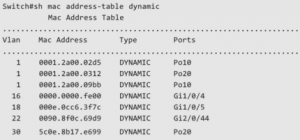
Once you have the MAC address and have access a network switch, you can use the “show mac address-table address” command to try to track down the switch port the host is connected to.

See below for a demonstration:

Here I have a Windows 10 machine with a MAC address of 00-22-68-20-16-C5. You can also see that it has an IP address of 192.168.1.25 (sometimes this is needed so that you ping it to see if it responds on the network).
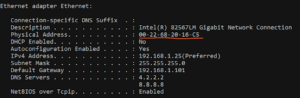
To see the syntax of the “show mac address-table address” on a Cisco catalyst switch, just type as shown below :

cisco-sw-1#show mac address-table address ?

H.H.H 48 bit mac address

You can see that it expects the MAC address in a decimal format in blocks of three. Now see what happens when I type that out :

cisco-sw-1#show mac address-table address 0022.6820.16c5

Mac Address Table

—————————————————

Vlan       Mac Address       Type Ports

——      ———–———–       ——–—–

10        0022.6820.16c5       DYNAMIC         Gi2/0/48<—- It is going through this port.

Total Mac Addresses for this criterion : 1

There you can see that it shows the MAC address is going through port Gi2/0/48 on switch cisco-sw-1. You can issue “show run int gi2/0/48” to check that port’s configuration :

cisco-sw-1#show run int gig2/0/48

Building configuration…

Current configuration : 133 bytes

!

interface GigabitEthernet2/0/48

switchport trunk encapsulation dot1q

switchport trunk native vlan 10

cswitchport mode trunk

end

We know from the above output (and from the show mac output) that this is a trunk port and usually a higher numbered port is connected to another neighboring switch. You can also verify this by issuing “show cdp neigh” :

cisco-sw-1#show cdp neigh

Capability Codes: R – Router, T – Trans Bridge, B – Source Route Bridge

S – Switch, H – Host, I – IGMP, r – Repeater, P – Phone,

D – Remote, C – CVTA, M – Two-port Mac Relay

   Device ID         Local Intrfce Holdtme         Capability Platform Port ID

cisco-sw-2               Gig 2/0/48 174                 T S WS-C3524- Fas 0/24

You can see that there is another switch connected to it and the port that it uses. Again, the host that we’re tracking has a MAC address of 0022.6820.16c5 and IP address of 192.168.1.25 and it is seen through our neighbor switch. We need to ssh or telnet to it to repeat the steps above to try to track the port it is connected to.

I am going to log into that switch but if you don’t know the management IP of that switch, you can issue “show cdp neigh detail” and it will show you its assigned management IP, see below :

cisco-sw-1#show cdp neigh detail

—————————————————

Device ID: cisco-sw-2

Entry address(es) :

IP address: 192.168.1.101

Platform: cisco WS-C3524-XL, Capabilities: Trans-Bridge Switch

Interface: GigabitEthernet2/0/48, Port ID (outgoing port): FastEthernet0/24

Holdtime : 154 sec

Version :

Cisco Internetwork Operating System Software

IOS ™ C3500XL Software (C3500XL-C3H2S-M), Version 12.0(5)WC3b, RELEASE SOFTWARE (fc1)

Copyright (c) 1986-2002 by cisco Systems, Inc.

Compiled Fri 15-Feb-02 10:51 by antonino

advertisement version: 2

Protocol Hello: OUI=0x00000C, Protocol ID=0x0112; payload len=27, value=00000000FFFFFFFF010121FF000000000000003094BBEA40FF000A

VTP Management Domain: ‘ccie’

Native VLAN: 10

Duplex: full

cisco-sw-1#

There you can see that the management IP is 192.168.1.101. You can get the other switch’s detailed information such as model number and version it is running..etc. I have a really old switch in my lab.

Now let’s access that switch and see try to track down that host :

cisco-sw-1#telnet 192.168.1.101

Trying 192.168.1.101 … Open

User Access Verification

Username: paula

Password :

cisco-sw-2>en

Password :

cisco-sw-2#show mac address 0022.6820.16c5

Non-static Address Table :

Destination Address Address Type VLAN Destination Port

———————         —————        ——————–——

0022.6820.16c5       Dynamic 10        FastEthernet0/11 <–Bingo! Here is our port!

Now you see that the host is connected to port Fast0/11. You can also issue show run int fast0/11 to verify that it is an access port (typically used for end user’s device)

cisco-sw-2#show run int fast0/11

Building configuration…

Current configuration :

!

interface FastEthernet0/11

switchport access vlan 10

End

You can see that it is connected to VLAN 10, which may be useful for other purposes.

What happens if when you run the show mac-address-table address command and it doesn’t return anything at all? It might be because the device has been idle for sometime and it is not being alive on the network anymore. Most switches have a MAC aging timer with 5 minutes and after that, it clears the CAM table (or MAC address table). This is because the switch has only so much memory and it can’t hold all the MAC addresses it has learned in its table forever. It needs to clear that and make room for newer MAC addresses as they are active and the cycle repeats.

You then have to generate some activity by pinging its IP address and then you can start issuing the show mac address command. Continue to repeat this process on all neighboring switches (if needed) until you can identify the switch that has the host connected to it.

Here is another trick. If you want to know the IP address of that MAC address, you can issue a show arp and it will tell you the IP address.

cisco-sw-1#show arp | inc 0022.6820.16c5

Internet 192.168.1.25               0 0022.6820.16c5 ARPA      Vlan 10

The above steps should also work for different vendors as well and they may have different syntax. Just check out the correct syntax if needed.

If you need help with any of the above or with troubleshooting in general, please feel free to reach out to us at sales@accendnetworks.com for a free consultation and we’ll be glad to assist you.

Categories
Blogs

Vmware Service Provider | Vmware Cloud Services

For over a decade, Accend has helped countless businesses maximize their profits by cutting back on operational costs by 45% or more. As a responsible VMware service provider, we have catered to the needs of several organizations — from startups to Federal agencies and everything in between. Our services include OS-level virtualization, para virtualization, full virtualization and more. We have the required subject matter expertise to remotely guide you through the VMware setup and installation process effortlessly.

As a VMware cloud service provider, we help businesses throughout the digital transformation process, by giving them all the leverage that they need. Our cutting-edge cloud management solutions make it easier for you to embrace technology, without worrying too much about managing it. As your managed service provider, we take care of all your cloud computing needs, which lets you focus on growing your business. Plus, you can do so without worrying about internal data security and the costs involved in it. With years of experience in providing network security solutions, we know what works and what doesn’t.

As your virtualization service provider, we can help you manage your resources more effectively and help reduce operational costs through efficient cloud management, network management, and storage solutions. This includes a visible reduction in hardware costs, energy costs, and an increase in productivity.

As a renown VMware service provider in California, we also provide technical assistance to the healthcare sector, which is prone to ransomware and DDoS attacks. With the increase in cybercrime, our responsibilities have increased exponentially and so has yours. So, you need to act fast and get the most out of your resources, but without compromising your internal security. As an ethical cloud computing service provider, we make it a point to keep your data safe and secure.

In the past, clients have approached us to set up the VDI platform and segregate existing resources into several virtual machines. We have also been relied upon for the installation of various VMware modules like the VMware Horizon View which enables remote access to a virtual desktop and Workspace One which enables centralized control. We have also assisted in configuring the switch port for trunk configuration to support the VMware vSphere.

With a combined experience of over 50 years as a vCloud service provider, our VMware solutions have helped organizations throughout the planning and implementation of disaster recovery measures. As one of the best VMware service providers, we offer tailormade solutions that are efficient, yet affordable. By connecting VMware to your physical servers, we help businesses maximize their profits by unleashing the power of virtualization. This gives you the power to limit access to confidential data and also to decide how you wish to use your resources.

Whether you have on-premise servers or hire the services of a cloud service provider, we would be glad to help. As one of the leading VMware service providers in the USA, our services include planning and managing your cloud architecture from start to end. Our core focus is on enhancing network security, ensuring network redundancy and virtualization. This lets you run your application without worrying about infrastructure incompatibility or lack of speed.

Categories
Blogs

Network Consultant Company | Network Services California

Are you inundated with IT projects and not sure whom to offload some of your IT Projects to? Look no further. Accend Networks has a combined 80+ years of experience with a team of high caliber engineers, most with over 5+years of experience. We are headquartered in northern California but have clients nationally. Our engineers have triple CCIEs, triple JNCIAs, CISSP, CEH, and MCSA, just to name a few, and have worked for big brand and Fortune 500 companies like Cisco Systems, Salesforce, Expedia\Hotwire, FireEye, and Webex.

We have the solid experience to assess your IT projects and provide you with industry’s best practice design and recommendation. We analyze your IT projects holistically, ensuring that you have the best solution from the physical to the software and application layer. This includes redundancy at all layers because security and availability are important.

Our approach is simple. We schedule a call with you to better understand your objectives and requirements. This may involve one or more network consultants from our company. We may make a suggestion during the initial call or in subsequent meetings. If the suggested solution is not feasible for you, we’ll conduct further research free of charge. At the end, you’re provided with a solution and, hopefully, you’ll utilize our network consulting services for implementation.

Our IT network consultants keep up to date with current industry trends and technology so they are always at the forefront of IT. We understand that technology is ever changing and to compete in this market, it is something we take seriously.

Let us be your IT network consultants, partnering with you focus to grow your business. We serve businesses of all sizes and industries, including federal, state, city municipalities and K-12 clients. There are many aspects and challenges to keeping and running an IT department such as making routing and VLANs changes, troubleshooting duplex mismatch errors and spanning tree protocol, server patches, keeping antivirus and antimalware current on laptops, desktops and all endpoints. We have tools that can automatically handle these tasks for you, thereby saving countless man hours. Get alerts for critical issues and rest assured that someone from our NOC team will help you resolve them. You’ll only get notified when someone is needed on site and/or there is a physical problem. You’ll be involved less than 10% of the time.

Our NOC team is fully certified and can support technology from many vendors. The members are fully trained and can operate in a 24/7 environment. You can check out our case studies, testimonials and Google reviews on our website. Other references are available upon request.

Contact us today at 408-784-2345 or toll free at 855-8ACCEND. You may also fill out this contact form and someone will get in touch with you asap. We serve clients throughout California (northern and southern), and across the United States. We have a satellite office in Los Angeles, California.

Categories
Blogs

Google Cloud Endpoints | Google Cloud Services

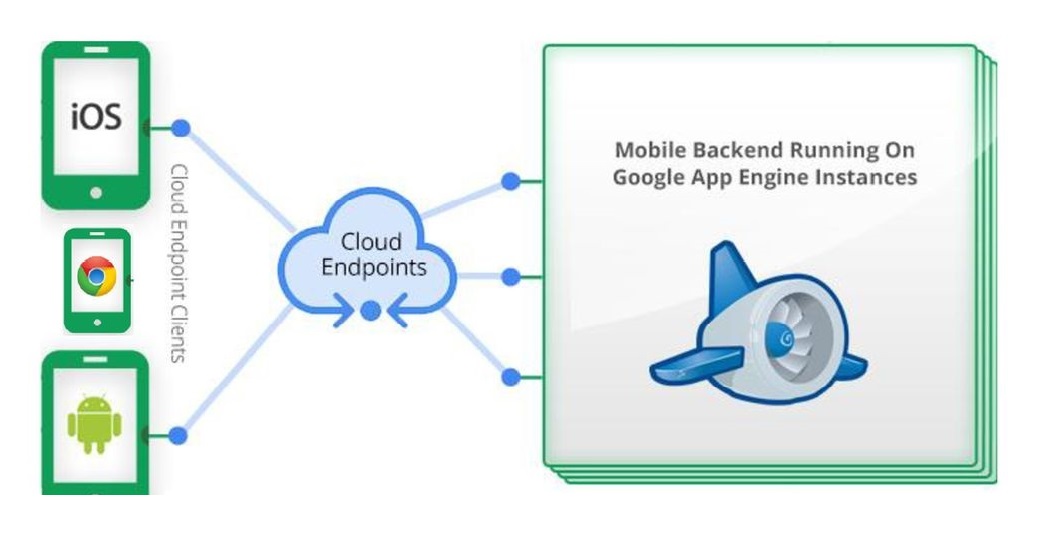
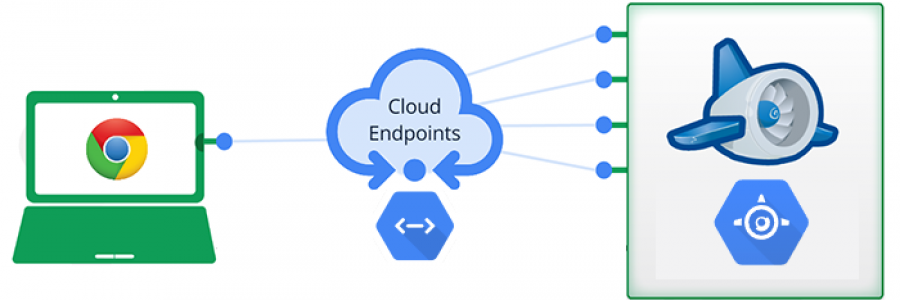
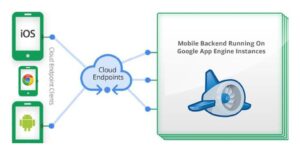
Apple iOS, Androids, Apple iPAD, Chromebooks, and other tablets are the common Google cloud endpoints found today. Servers, laptops, and desktops are also cloud endpoints because they access the same cloud environment, but users tend to think differently.

Below is an example of cloud endpoints connecting to a Google cloud-based computing environment :

We have helped many clients with cloud services such as deploying and configuring Palo Alto Networks’ Prisma SaaS, formerly Aperture, building a virtual private cloud (VPC) from their on-premise gateways to a cloud platform on Microsoft Azure or Amazon AWS, setting up and configuring different Meraki appliances such as cloud-based firewalls, routers, switches, and access points, and migrating emails from different hosting platforms to Google Suite for Business Enterprise.

Part of the above projects above include configuring and ensuring that the cloud endpoints are able to access the new environment. In the case of a Google cloud platform such as Google Suite, the endpoints need to be configured with a proper setting to secure access to the Google cloud-based email. Each user account is created with a unique email ID and password. Customers are advised to enable two-factor authentication, which is now mandated by the Google cloud computing team.

Microsoft Azure, Amazon AWS, and Google Cloud are the top three cloud providers. A cloud computing environment such as the one from Google cloud enables users to quickly set up their new infrastructure and provides a cheaper solution as well. Administer can manage the configuration panel through the Google cloud console, which can be accessed by any cloud endpoint that can access the Google environment. This often usually only requires the administer to have internet access, along with an administrative credential.

Clients should be aware that security is critical when cloud endpoints connect to the cloud- based platform, as such Google cloud, to avoid any unwanted intrusion. They should take note of enabling two-factor authentication, a long and unique password (choosing a password that is different from other applications), changing the password often and/or as required by the client’s compliance regulation, and have their security policy checked and configured. This is something our security consultant can help with, especially if the client wishes another pair of eyes to check that the settings are configured correctly.

Another request we’re getting is configuring and installing the Google Cloud Anthos GKE. This is hosted on the Google Cloud computing environment. Anthos GKE is a hybrid cloud software that allows interconnectivity between Google Kubernetes Engine (GKE) to an on-premises data center. After the installation of GKE on-prem, the client can then use Google Connect to view and sign into their on-premises and on-cloud Kubernetes clusters from the same interface as Google Cloud Console. This project is a fairly complex setup as different stages are needed, and strict network requirements need to be in place for the GKE environment to work properly.

Ease of use and mobility are the top two reasons for which clients move to a cloud environment. They can access the new environment using a variety of cloud endpoints available today.

We have certified Google consultants on staff to help our clients with their cloud projects. It could be an email migration project, spinning up a new virtualized environment, assessing a current security setup, and configuring access for different cloud endpoints. The cloud environment can be located in California or anywhere throughout the United States.

We can help customers with subscribing to the different cloud services that Google provides or just use our service after purchases have been made.

Reach out to us today at 408-784-2345 local or 855-8ACCEND national to have a specialized cloud expert get back to you about your cloud project.