Accend Networks San Francisco Bay Area Full Service IT Consulting Company

Categories
Blogs

How to Configure AWS CLI: A Step-by-Step Guide for Beginners
How to Configure AWS CLI: A Step-by-Step Guide for Beginners

The AWS Command Line Interface (CLI)is a powerful tool that allows developers and system administrators to manage their AWS services directly from the command line. This blog will walk you through the process of configuring AWS effectively, providing you with the knowledge and best practices to make the most of this essential tool.

What is AWS CLI?

The AWS CLI is a unified tool that provides a consistent interface for interacting with AWS services. With the AWS CLI, you can automate tasks, manage resources, and execute commands without having to navigate through the AWS Management Console.

Step-by-Step Guide to Setting Up AWS CLI

Step 1: Install AWS CLI

Below are step-by-step instructions to configure the AWS CLI on your local machine or an EC2 instance and run multiple commands:

Make sure you have an Instance running, you can as well do this on your local machine.

Install AWS CLI

Ensure that you have the AWS CLI installed on your local machine. You can download and install it from the official AWS CLI download page.

Step 2: Open a Terminal or Command Prompt

Open your terminal.

In the terminal, run the following command:

aws configure

Enter AWS Access Key ID

Enter the AWS Access Key ID associated with your IAM user.

Enter the AWS Secret Access Key

Enter the AWS Secret Access Key associated with your IAM user.

Set Default Region

Enter the default region you want to use.

Set Output Format

Choose the default output format.

Example Interaction:

AWS Access Key ID [None]: YOUR_ACCESS_KEY_ID

AWS Secret Access Key [None]: YOUR_SECRET_ACCESS_KEY

Default region name [None]: us-central-1

Default output format [None]: json
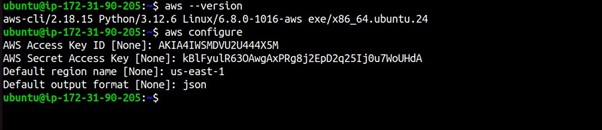
To ensure that your AWS CLI configuration is set up correctly, you can run a simple command to check your credentials:

aws sts get-caller-identity

This command should return details about your AWS account and confirm that your CLI is configured correctly.
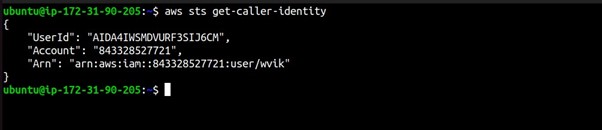
Run AWS CLI Commands

Example 1: List S3 Buckets

aws s3 ls

This command will list the S3 buckets in your AWS account.

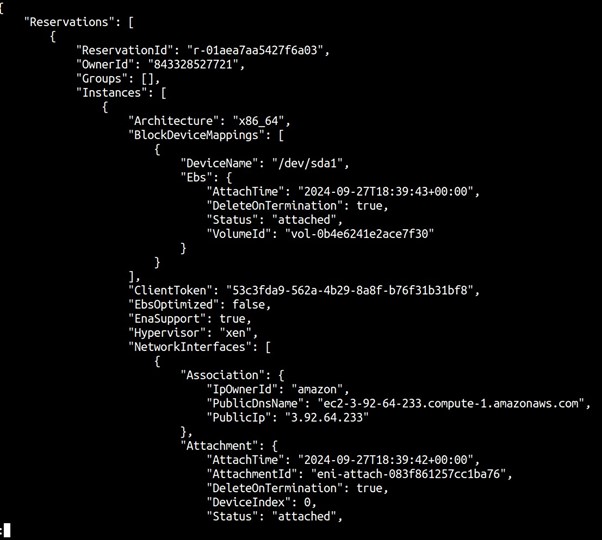
Example 2: Describe EC2 Instances

aws ec2 describe-instances

This command will describe your EC2 instances in the default region.

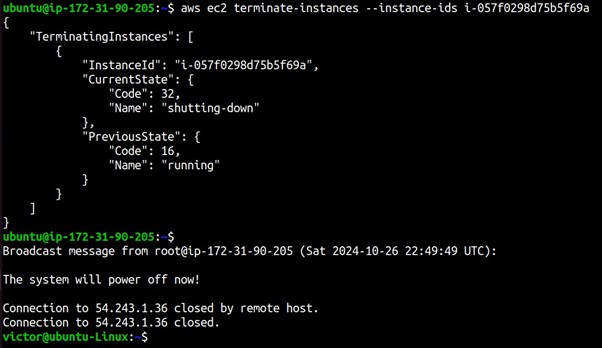
You can also run the CLI command to terminate your EC2 instance as shown below.

Best Practices for Configuring AWS Command Line Interface

Use IAM Roles: Instead of using long-term access keys, consider using IAM roles for enhanced security, especially if you’re running CLI commands from EC2 instances.

Utilize Profiles: If you manage multiple AWS accounts, create separate profiles for each account by using the –profile flag during configuration:

Copy code

aws configure –profile myprofile

Environment Variables: You can also set environment variables for your AWS credentials. This is useful for CI/CD pipelines or automation scripts.

Troubleshooting AWS CLI Configuration Issues

If you encounter issues while using AWS CLI, consider the following troubleshooting tips:

Check Credentials: Ensure that your AWS Access Key ID and Secret Access Key are correct and have the necessary permissions.

Validate Region: Make sure that the region specified in your configuration is correct and that the services you are trying to access are available in that region.

Session Expiry: If you’re using temporary credentials, be aware that they expire after a certain duration. Refresh your credentials if necessary.

Conclusion

Configuring AWS CLI is a straightforward process that empowers you to manage AWS services efficiently from the command line. By following this step-by-step guide, you can set up AWS CLI, verify your configuration, and implement best practices to enhance your cloud management capabilities.

Thanks for reading and stay tuned for more.

If you have any questions concerning this article or have an AWS project that requires our assistance, please reach out to us by leaving a comment below or email us at sales@accendnetworks.com.


Thank you!
Categories
Blogs

How AWS App Runner Simplifies Web App Management

How AWS App Runner Simplifies Web App Management

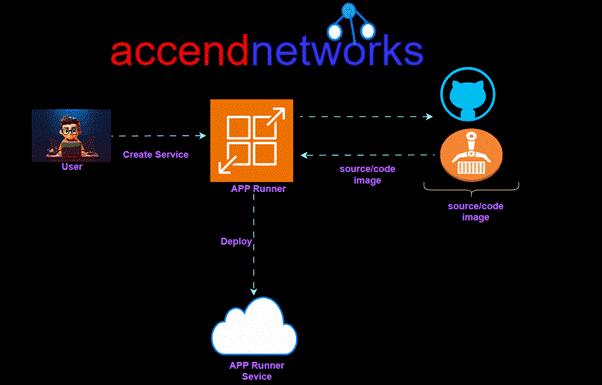
AWS App Runner dashboard

Introduction to AWS App Runner

Deploying web applications in the cloud can be complicated, especially for teams that don’t have a lot of experience with cloud infrastructure. AWS App Runner helps with this by offering a fully managed service that lets you deploy web applications and APIs directly from your source code or a container image. In this article, we’ll look at how AWS App Runner makes deployment easier and discuss its main features.  

What is AWS App Runner?

AWS App Runner is an AWS service that provides a fast, simple, and cost-effective way to deploy from source code or a container image directly to a scalable and secure web application in the AWS Cloud. You don’t need to learn new technologies, decide which compute service to use, or know how to provision and configure AWS resources.

AWS App Runner connects directly to your code or image repository. It provides an automatic integration and delivery pipeline with fully managed operations, high performance, scalability, and security.

AWS App Runner dashboard

AWS App Runner supports two main deployment methods:

  1. Source-based deployment: Directly from your source code.
  2. Container-based deployment: Using container images from Amazon ECR (Elastic Container Registry) or Docker Hub.

Benefits of Using AWS App Runner for Web Apps

  1. Automatic Scaling
    AWS App Runner automatically scales your application based on incoming traffic, so you don’t need to manually configure scaling rules. This feature is particularly useful for applications with varying workloads or unpredictable traffic patterns.
  1. Fully Managed Infrastructure
    App Runner abstracts the underlying infrastructure, handling the setup, management, and maintenance of servers and load balancers. This makes it ideal for teams with limited infrastructure experience or those focused primarily on development.
  1. Cost-Effectiveness
    With pay-as-you-go pricing, App Runner charges you based only on the resources your application uses.
  1. Enhanced Security
    App Runner integrates with other AWS services like AWS Identity and Access Management (IAM) to enforce security policies. Plus, applications deployed via App Runner are automatically encrypted, adding an extra layer of data protection.

Pricing for App Runner

App Runner provides a cost-effective way to run your application. You only pay for resources that your App Runner service consumes. Your service scales down to fewer compute instances when request traffic is lower. You have control over scalability settings: the lowest and highest number of provisioned instances, and the highest load an instance handles.

Who is App Runner for?

If you’re a developer, you can use App Runner to simplify the process of deploying a new version of your code or image repository.

For operations teams, App Runner enables automatic deployments each time a commit is pushed to the code repository or a new container image version is pushed to the image repository.

Use Cases for AWS App Runner

AWS App Runner is ideal for a range of scenarios, including:

  • Rapid Prototyping: Quickly deploy prototypes and get feedback without managing infrastructure.
  • APIs and Microservices: App Runner is well-suited for microservices architectures, as it handles scaling and load balancing out of the box.
  • Startups and Small Teams: With a managed infrastructure and cost-effective pricing, AWS App Runner is ideal for teams that prioritize ease of use and affordability.

Use Cases for AWS App Runner

AWS App Runner vs. Other AWS Services

AWS offers other services for deploying containerized applications, such as Amazon Elastic Kubernetes Service (EKS) and Amazon Elastic Container Service (ECS). However, App Runner differs by focusing on simplicity and managed deployments. Here’s a quick comparison:

  • AWS App Runner: Best for quick and easy deployment with minimal infrastructure management.
  • Amazon ECS: Offers more control but requires additional setup and configuration.
  • Amazon EKS: Ideal for those looking for Kubernetes-native deployment but has a steeper learning curve.

Conclusion

AWS App Runner simplifies web application deployment by handling infrastructure, scaling, and security, making it easier than ever to deploy applications on AWS. Whether you’re a startup, a developer, or a team seeking an efficient way to deploy containerized applications without managing infrastructure, App Runner offers a robust, cost-effective solution.

Thanks for reading and stay tuned for more.

If you have any questions concerning this article or have an AWS project that requires our assistance, please reach out to us by leaving a comment below or email us at sales@accendnetworks.com.


Thank you!
Categories
Blogs

Boost DynamoDB Performance with DynamoDB Accelerator (DAX): A Complete Guide

Boost DynamoDB Performance with DynamoDB Accelerator (DAX): A Complete Guide

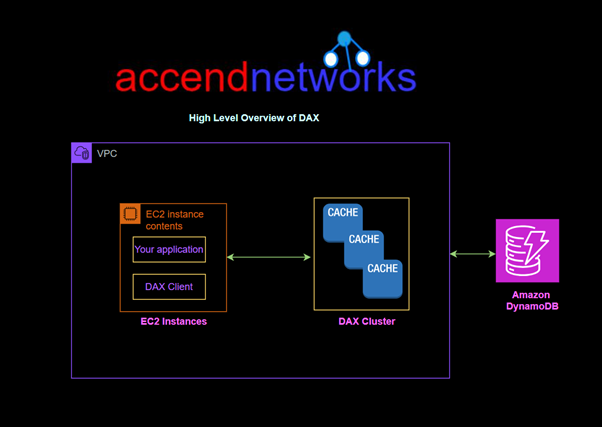
DAX architecture

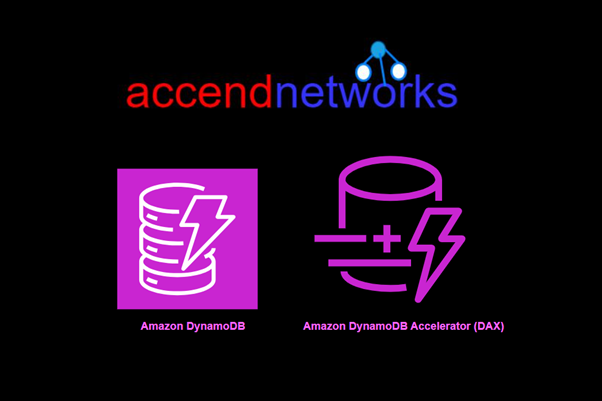
Amazon DynamoDB is a strong, fully managed NoSQL database that can grow quickly and adapt easily. But when dealing with high-traffic applications or high latency workloads, even the best databases can improve with caching. This is where DynamoDB Accelerator (DAX) helps.

In this blog post, we’ll look at how DynamoDB Accelerator (DAX ) works, its advantages, and how to use it to make DynamoDB work better.

What is DynamoDB Accelerator (DAX)?

DynamoDB Accelerator (DAX) is an in-memory cache for DynamoDB that accelerates the read performance of your tables. As an external caching layer, DAX can reduce the time it takes to retrieve frequently accessed data by caching it in memory. Unlike traditional caching layers, which require setup and maintenance, DAX is fully managed by AWS and integrates seamlessly with DynamoDB.

With DAX, applications can achieve up to a 10x reduction in read latency especially for read-heavy and repeated read workloads.

How to Set Up and Configure DAX

DAX sits between your application and DynamoDB tables, functioning as an in-memory cache for read requests. When your application queries data, DAX first checks if the requested data is available in the cache:

  • If the data is present in DAX, it’s returned directly from memory, achieving microsecond latency.
  • If the data is not in DAX, it queries DynamoDB, retrieves the result, and then caches it in DAX for future requests.

Amazon DynamoDB Accelerator (DAX) is designed to run within an Amazon Virtual Private Cloud (Amazon VPC) environment.

To run your application, you launch an Amazon EC2 instance into your Amazon VPC. You then deploy your application (with the DAX client) on the EC2 instance.

DynamoDB workflows

Key Features of DynamoDB Accelerator (DAX)

Fully Managed and Highly Available: DAX is fully managed by AWS, meaning you won’t have to worry about infrastructure management, setup, or maintenance.

In-Memory Caching for Microsecond Latency: As an in-memory cache for DynamoDB, DAX stores recently accessed data in memory, significantly improving data retrieval speeds.

Seamless Integration with DynamoDB APIs: One of DAX’s standout features is that it seamlessly integrates with existing DynamoDB APIs, meaning it doesn’t require changes to application logic.

Configurable Cache TTL (Time to Live): DAX uses a default TTL of five minutes, which means cached data will automatically expire after five minutes to ensure consistency with DynamoDB. However, TTL can be adjusted to meet application needs, allowing you to balance cache freshness and retrieval speed.

Benefits of Using DynamoDB Accelerator (DAX)

  1. Reduced Read Latency: DAX provides single-digit millisecond response times by reducing the number of direct queries to DynamoDB.
  2. Cost Efficiency: By caching frequently read items, DAX reduces the number of read operations hitting DynamoDB directly, helping reduce costs on read-heavy workloads.
  3. Scalability: DAX is designed to scale automatically with your DynamoDB usage patterns. It can handle sudden spikes in traffic by distributing cache data across multiple nodes.
  4. Fully Managed Service: AWS takes care of the setup, patching, and maintenance of DAX clusters, allowing developers to focus on application logic.
  5. Ease of Integration: DAX works seamlessly with DynamoDB and requires only minor adjustments to existing code to take advantage of its performance improvements.
Use Cases for DynamoDB Accelerator (DAX)

DAX is ideal for read-heavy workloads where latency is critical and immediate consistency is not required. Some popular use cases include:

  • E-commerce Catalogs: DAX allows product catalogs to load faster, especially during high-traffic events like Black Friday, where many users are browsing at once.
  • Gaming Leaderboards: Leaderboards require fast access to score data, and DAX’s caching can handle high read volumes effectively.
  • Social Media Applications: Social feeds involve numerous reads of user content, which DAX can accelerate significantly.
  • Session Stores: User session data, which is read frequently but not often updated, can benefit greatly from DAX caching.
Pricing and Cost Considerations

DAX is priced based on the hourly usage of nodes in your cluster, and additional charges apply for data transfer. While there is an upfront cost for using DAX, the reduction in DynamoDB read requests can lead to significant savings over time, particularly for read-intensive applications.

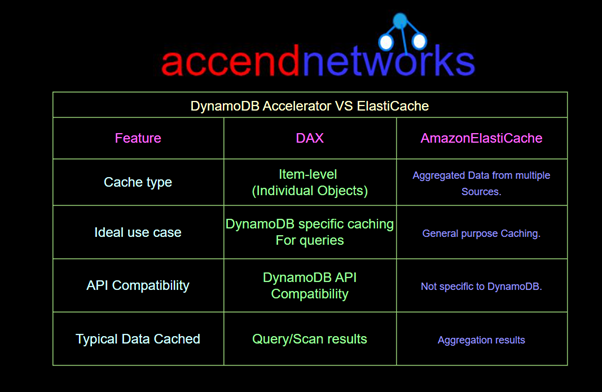
DynamoDB Accelerator (DAX) vs. Amazon ElastiCache

While DAX serves as an in-memory cache for individual DynamoDB items, Amazon ElastiCache is a more general-purpose caching solution, suitable for caching complex, aggregated data from multiple sources. Here’s a quick comparison

Diagram illustrating DynamoDB Accelerator (DAX) performance benefits

Conclusion

DynamoDB Accelerator (DAX) is a powerful tool for reducing read latency, optimizing costs, and delivering seamless performance for read-heavy applications. By leveraging in-memory caching, DAX offers a way to handle high-traffic workloads without sacrificing speed or scalability.

Thanks for reading and stay tuned for more.

If you have any questions concerning this article or have an AWS project that requires our assistance, please reach out to us by leaving a comment below or email us at sales@accendnetworks.com.


Thank you!
Categories
Blogs

AWS Resource Access Manager

AWS Resource Access Manager (RAM) Explained: Securely Share Resources Across AWS Accounts

Introduction

Amazon Web Services (AWS) provides Resource Access Manager (RAM), a powerful service that enables you to share AWS resources with other AWS accounts. In multi-account AWS environments, RAM simplifies resource sharing, making it easier to manage permissions while maintaining security. AWS RAM provides a flexible solution for sharing resources like Amazon VPC subnets, Route 53 Resolver rules, and more.

What is AWS Resource Access Manager?

AWS Resource Access Manager (RAM) is a service that allows users to share AWS resources across different accounts. By using RAM, organizations can achieve seamless collaboration between teams and departments while maintaining a high level of security and control over the resources being shared. RAM works particularly well in environments using AWS Organizations, where multiple accounts are centrally managed under one structure.

AWS Resource Groups

Create groups for your AWS resources. Then, you can use and manage each group as a unit instead of having to reference every resource individually. Your groups can consist of resources that are part of the same AWS CloudFormation stack, or that are tagged with the same tags. Some resource types also support applying a configuration to a resource group to affect all relevant resources in that group.

Resource share

You share resources using AWS RAM by creating a resource share. A resource share has the following three elements:

  • A list of one or more AWS resources to be shared.
  • A list of one or more principals to whom access to the resources is granted.
  • A managed permission for each type of resource that you include in the share. Each managed permission applies to all resources of that type in that resource share.

Sharing account

The sharing account contains the resource that is shared and the AWS RAM administrator creates the AWS resource share by using AWS RAM.

Consuming principals

The consuming account is the AWS account to which a resource is shared. The resource share can specify an entire account as the principal,

Some of the resources you can share using AWS RAM include:

  • Amazon Virtual Private Cloud (VPC) subnets
  • AWS Transit Gateway
  • Amazon Route 53 Resolver rules
  • AWS License Manager configurations

Benefits of Using AWS RAM

Simplified Multi-Account Management: RAM enables easy management of shared resources across accounts within an AWS Organization, reducing the complexity of managing separate resources for each account.

Enhanced Security: Resource sharing with RAM allows you to control which resources are accessible to specific accounts, ensuring a secure environment.

Cost-Efficiency: By sharing resources like VPC subnets and Transit Gateways, you can avoid redundant resources, minimizing costs.

Scalability: RAM is built to scale, allowing organizations to manage and share resources as they grow.

Managing and Monitoring Resource Shares

Once your resources are shared, AWS RAM provides several options for ongoing management and monitoring.

  • View Active Shares: From the RAM dashboard, you can view all active shares, including details of resources, permissions, and principals.
  • Modify Resource Shares: RAM allows you to modify existing shares if you need to add or remove resources, change permissions, or update target accounts.
  • Audit Resource Sharing: Use AWS CloudTrail to log RAM activities for security auditing and compliance, ensuring you can track resource-sharing actions over time.

Pricing

AWS RAM is offered at no additional charge. There are no setup fees or upfront commitments.

Best Practices for Using AWS RAM

  1. Use AWS Organizations: If managing multiple accounts, use AWS Organizations to streamline resource sharing with OUs and individual accounts.
  2. Follow the Principle of Least Privilege: Only grant permissions necessary for resource usage to minimize security risks.
  3. Enable CloudTrail for Monitoring: Enable CloudTrail to monitor and audit resource-sharing actions for compliance and security.
  4. Review Permissions Regularly: Periodically review RAM permissions and update them to reflect current usage and security requirements.

Conclusion

AWS Resource Access Manager (RAM) provides an effective and secure way to manage resource sharing across AWS accounts, helping organizations streamline their operations, reduce costs, and maintain robust security controls. AWS RAM is a valuable tool for any organization leveraging a multi-account setup, offering flexibility, security, and efficiency as you manage your cloud resources.

Thanks for reading and stay tuned for more.

If you have any questions concerning this article or have an AWS project that requires our assistance, please reach out to us by leaving a comment below or email us at sales@accendnetworks.com.


Thank you!
Categories
Blogs

Understanding Relational Database Service in AWS

Understanding Relational Database Service in AWS: A Comprehensive Guide

AWS Relational Database Service (RDS) setup

Amazon Web Services (AWS) offers a powerful database service known as Amazon Relational Database Service (RDS). It simplifies the process of setting up, operating, and scaling relational databases in the cloud. With built-in scalability, automated backups, and security features, RDS in AWS allows organizations to focus on applications rather than database management.  We will dive deeper into relational database service in AWS.

What is Amazon RDS?

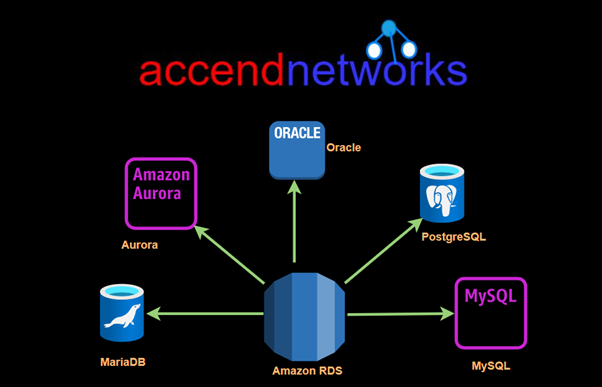
Amazon RDS (Relational Database Service) is a managed service that makes it easy to set up, operate, and scale relational databases in the cloud. It automates tedious administrative tasks like hardware provisioning, database setup, patching, and backups. Whether you’re working with MySQL, PostgreSQL, MariaDB, Oracle, or SQL Server, AWS RDS offers optimized solutions for every need.

Types of Database Engines in Amazon RDS

Amazon RDS supports multiple database engines. AWS offers six popular engines that cater to different use cases.

Amazon Aurora: A MySQL and PostgreSQL compatible relational database designed for the cloud. It offers the performance and availability of high-end commercial databases at a fraction of the cost.

Amazon RDS for MySQL: Provides a fully managed MySQL database environment. It’s one of the most popular open-source databases, known for its speed and reliability.

Amazon RDS for PostgreSQL: Offers managed environments for PostgreSQL, a powerful, open-source database engine known for its advanced data types and support for complex queries.

Amazon RDS for MariaDB: This is another open-source option derived from MySQL. It’s designed for developers who prefer MariaDB over MySQL.

Amazon RDS for Oracle: Offers a fully managed environment for Oracle Database.

Amazon RDS for SQL Server: Provides managed Microsoft SQL Server databases, making it easy to deploy SQL Server in the cloud.

Amazon RDS DB instances

AWS Relational Database Service (RDS) setup

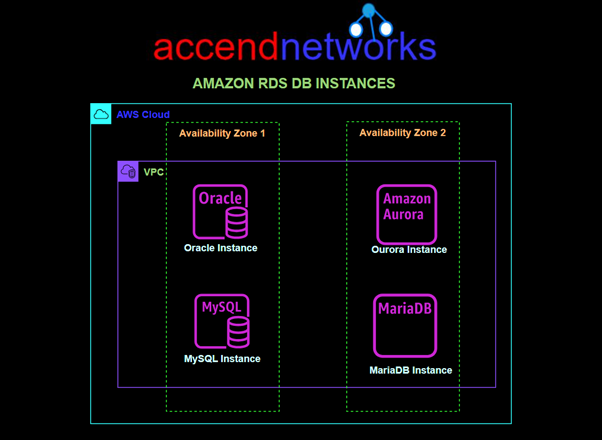
A DB instance is an isolated database environment in the AWS Cloud. The basic building block of Amazon RDS is the DB instance. Your DB instance can contain one or more user-created databases.

Access control with security groups

managing databases in AWS RDS

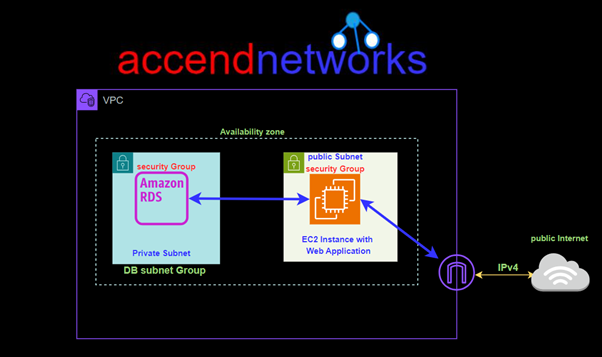
security group controls access to a DB instance by allowing access to IP address ranges or Amazon EC2 instances that you specify. You can apply a security group to one or more DB instances.

Key Features of AWS RDS

Automated Backups and Snapshots: Amazon RDS automatically performs backups of your database, ensuring data recovery in case of a disaster. You can also create point-in-time snapshots manually.

Scalability and Flexibility: RDS allows you to easily scale the storage and compute resources of your database instances based on application demand. AWS provides vertical and horizontal scaling options for high availability and performance.

Multi-AZ Deployment for High Availability: With multi-AZ deployments, Amazon RDS provides enhanced availability and data durability. This feature automatically replicates your data across multiple Availability Zones (AZs), ensuring failover support.

Security and Compliance: AWS RDS integrates with AWS Identity and Access Management (IAM), Virtual Private Cloud (VPC), and other security services to ensure encryption, access control, and network isolation. It also meets various compliance standards, such as HIPAA and SOC 1, 2, and 3.

Automatic Software Patching: Amazon RDS regularly applies security patches and updates to your database engines, reducing the manual effort required for patch management.

Monitoring and Performance Insights: RDS provides performance metrics through AWS CloudWatch and Amazon RDS Performance Insights, enabling you to monitor database performance and optimize queries.

Benefits of Using AWS RDS:

Ease of Use: AWS RDS abstracts away the complexity of database administration, providing a fully managed experience.

Cost Efficiency: With Amazon RDS, you only pay for the storage and compute resources you use, and there are no upfront costs. You can also take advantage of reserved instances for long-term savings.

High Availability: RDS Multi-AZ deployments ensure that your database is always available, even in the event of a hardware failure. This is critical for mission-critical applications where downtime can lead to significant business losses.

Automatic Failover: RDS automatically performs failover to a standby replica in case of a primary database instance failure, ensuring minimal downtime and data loss.

Integrated with Other AWS Services: AWS RDS seamlessly integrates with other AWS services like Amazon S3 and EC2 enabling businesses to create end-to-end automated solutions.

Common Use Cases for AWS RDS

Web and Mobile Applications: AWS RDS is ideal for applications that require scalable databases to manage customer data, transactions, and other relational data.

Enterprise Applications: Enterprises using ERP, CRM, or custom applications often use Amazon RDS for databases, leveraging its security, high availability, and scalability.

E-commerce Platforms: E-commerce businesses benefit from the reliable, scalable, and secure nature of AWS RDS to handle growing databases and real-time transactions.

Conclusion

Amazon RDS is a flexible and strong tool for handling relational databases in the cloud. It offers managed services, automatic backups, and scaling options, making database management easier while maintaining high availability, security, and performance. Whether you’re managing a large business application or a fast-changing web app, RDS on AWS can help you reach your database objectives efficiently and affordably.

Thanks for reading and stay tuned for more.

If you have any questions concerning this article or have an AWS project that requires our assistance, please reach out to us by leaving a comment below or email us at sales@accendnetworks.com.


Thank you!